cancel
Showing results for 
Search instead for 
Did you mean: 

July 7 - July 17 | Round 2 of the Power BI Dataviz World Championships. Don't miss your chance! Learn more

Reply
Anonymous
Not applicable

Column data = table name

I would like to append two tables, but I would like to be able to differenciate which data came from which table. Is there an easy way to pull the table name into the a column named "table" and use the table name as data? 

1 ACCEPTED SOLUTION

Add table name with your value using "Add Prefix" In Query Editor Window . Then you do the merging.


Eg. Vale = 103, Then Add "Table1" , O/P = Table1103


From the DAX  

Create new Column 

Value = MID(O/P,7,5) -- 5 give how long max digit u have 


Then u change the column datatype as Integer .


It will work.


View solution in original post

5 REPLIES 5
Anonymous
Not applicable

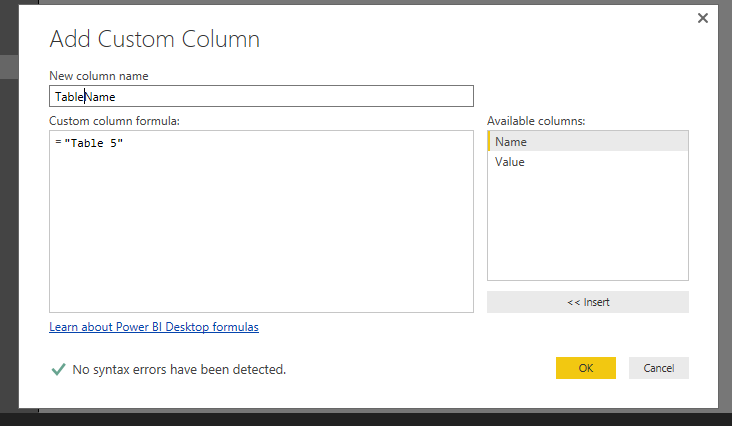
@Anonymous Not within the editor that allows you to append, but you can create custom columns on each of the tables and just insert the table name.


In the Query editor select "Add Custom Column" 

Name the column (ex. TableName)

set the value = "<Your Table Name>" (ex.    ="Table1")

Do that for both tables

Append the queries.


Anonymous
Not applicable

I tried that, but when I append the two tables it will only take the new column from the original table and will not add the new data from the other table for that column. 

@Anonymous


You need to add the custom column in Query Editor, not under Data tab.


Cap111ture.PNG

Cap333ture.PNG


Both tables need to add this table name column, then you can append correctly.

Captu77re.PNG


Regards,

Add table name with your value using "Add Prefix" In Query Editor Window . Then you do the merging.


Eg. Vale = 103, Then Add "Table1" , O/P = Table1103


From the DAX  

Create new Column 

Value = MID(O/P,7,5) -- 5 give how long max digit u have 


Then u change the column datatype as Integer .


It will work.


Add a custom column to each query before the Append with something like "=1" and "=2". The column name would be the same but when you import them, you know which row came from which original table.


Follow on LinkedIn
@ me in replies or I'll lose your thread!!!
Instead of a Kudo, please vote for this idea
Become an expert!: Enterprise DNA
External Tools: MSHGQM
YouTube Channel!: Microsoft Hates Greg
Latest book!:
DAX For Humans

DAX is easy, CALCULATE makes DAX hard...

Helpful resources

Announcements
FabCon and SQLCon Barcelona 2026

FabCon & SQLCon – Barcelona 2026

Join us in Barcelona for FabCon and SQLCon, the Fabric, Power BI, SQL, and AI community event. Save €200 with code FABCMTY200.

60 days of Data Days Carousel

Data Days 2026

Join Fabric Data Days 2026: 60 days of free live/on-demand sessions, challenges, study groups, and certification opportunities.

Power BI DataViz World Championships carousel

Power BI DataViz World Championships - June 2026

A new Power BI DataViz World Championship is coming this June! Don't miss out on submitting your entry.