
Share feedback directly with Fabric product managers, participate in targeted research studies and influence the Fabric roadmap.
Sign up nowGet Fabric certified for FREE! Don't miss your chance! Learn more
Hello!
I have a sales pipeline and I'm reporting against various different pieces of data. I have a number of bar charts and unforunately powerbi is sorting the 'sales stage' alphabetically which isn't what we'd like. I tried creating an individual measure for each sales stage, but when you have multiple charts this is very long and also only seemed to help for stacked and pie charts, not for standard bar charts.
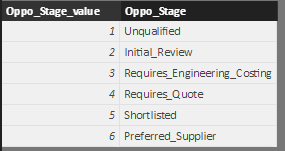
I do have a linked table which contains the sales stage and its order number:
However I can't get powerbi to sort in this order.
Please can you help?
Thanks in advance!
Solved! Go to Solution.
To use a different column when sorting, ensure that [Oppo_Stage] used in your visuals is from the table with the [Oppo_Stage_value] in it. In the Fields pane, select [Oppo_Stage], then in the Modeling tab, select Sort by Column, and choose [Oppo_Stage_value]. This should allow the text to be sorted based on the numbers.
Sort by Column
To use a different column when sorting, ensure that [Oppo_Stage] used in your visuals is from the table with the [Oppo_Stage_value] in it. In the Fields pane, select [Oppo_Stage], then in the Modeling tab, select Sort by Column, and choose [Oppo_Stage_value]. This should allow the text to be sorted based on the numbers.
Sort by Column
As simple as that! Thank you very much!
If you love stickers, then you will definitely want to check out our Community Sticker Challenge!
Check out the January 2026 Power BI update to learn about new features.
| User | Count |
|---|---|
| 64 | |
| 63 | |
| 49 | |
| 21 | |
| 18 |
| User | Count |
|---|---|
| 122 | |
| 120 | |
| 38 | |
| 36 | |
| 29 |