Join us in Barcelona for FabCon and SQLCon, September 28 - October 1, 2026.
This is best Fabric, Power BI, SQL and AI community event. How do we know? The last event sold out! Save €200 with code FABCMTY200.
Register now- Power BI forums
- Get Help with Power BI
- Desktop
- Service
- Report Server
- Power Query
- Mobile Apps
- Developer
- DAX Commands and Tips
- Custom Visuals Development Discussion
- Health and Life Sciences
- Power BI Spanish forums
- Translated Spanish Desktop
- Training and Consulting
- Instructor Led Training
- Dashboard in a Day for Women, by Women
- Galleries
- Data Stories Gallery
- Themes Gallery
- Contests Gallery
- QuickViz Gallery
- Quick Measures Gallery
- Visual Calculations Gallery
- Fabric Apps Gallery
- Notebook Gallery
- Translytical Task Flow Gallery
- TMDL Gallery
- R Script Showcase
- Webinars and Video Gallery
- Ideas
- Custom Visuals Ideas (read-only)
- Issues
- Issues
- Events
- Upcoming Events
The Fabric community is upgrading! Read all of the details including the timeline and what you can expect. Learn more
- Power BI forums
- Forums
- Get Help with Power BI
- Desktop
- Re: Column Secondary Sort Order
- Subscribe to RSS Feed
- Mark Topic as New
- Mark Topic as Read
- Float this Topic for Current User
- Bookmark
- Subscribe
- Printer Friendly Page


- Mark as New
- Bookmark
- Subscribe
- Mute
- Subscribe to RSS Feed
- Permalink
- Report Inappropriate Content
Column Secondary Sort Order
I have a bunch of orders, each with a status of Won, Lost or Open. All of these orders are divided by region. So I throw them all up on a Clustered Column chart, sorting by region. Great - all works. Except that for each region, the order of the columns within the region is alpha - Lost, Open, Won. I need it to be Won, Open, Lost.
So I created a new column - Status Order - and populated it with:
Status Order = IF('Order'[Status] = "Won",
                  1,
                  IF('Order'[Status] = "Open",
                     2,
                     3))
and used the Sort by Column item in the Modelling tab to sort by that column rather than by the Status column, which it was sorting by.
It didn't work - made no difference at all to the display.
What am I doing wrong? Or not doing?
Thanks in advance.


- Mark as New
- Bookmark
- Subscribe
- Mute
- Subscribe to RSS Feed
- Permalink
- Report Inappropriate Content
try this,
Drag drop the "Status Order" Column into the tooltip section of the chart and sort the chart on this "Status Order"
- Mark as New
- Bookmark
- Subscribe
- Mute
- Subscribe to RSS Feed
- Permalink
- Report Inappropriate Content
That loses me the initial sort, by region.
It also puts the Status Order column in the tooltip, where I don't want it.
- Mark as New
- Bookmark
- Subscribe
- Mute
- Subscribe to RSS Feed
- Permalink
- Report Inappropriate Content
Hi @Budfudder
How are you sorting this in modelling?
Try this way:
In fields Panel-> go to the table-> select Status column, Now go to Modelling tab-> Sort by Status order column.
Please confirm does it solve the problem.
Thanks
Raj

- Mark as New
- Bookmark
- Subscribe
- Mute
- Subscribe to RSS Feed
- Permalink
- Report Inappropriate Content
"
and used the Sort by Column item in the Modelling tab to sort by that column rather than by the Status column, which it was sorting by.
It didn't work - made no difference at all to the display."
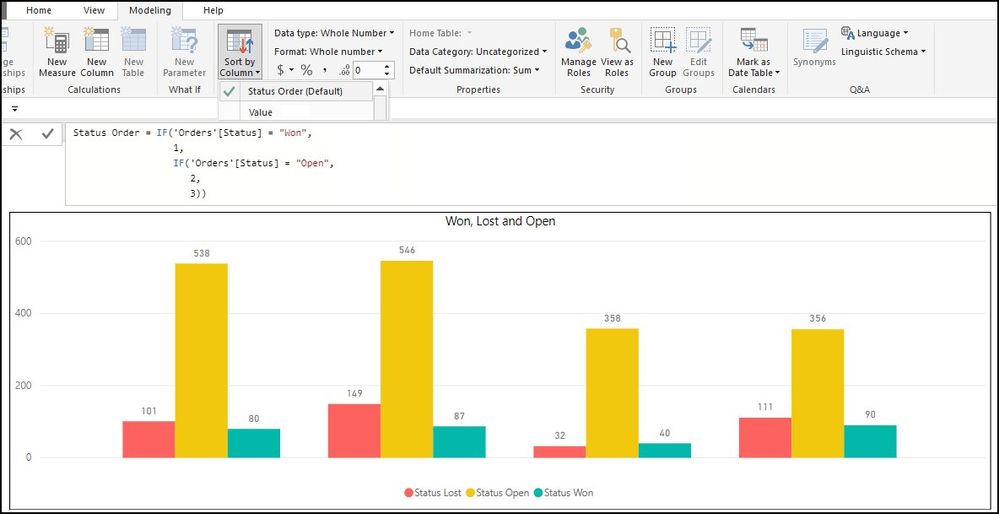
- Could you please post the snapshot of how you do this sorting?
Thanks
Raj
- Mark as New
- Bookmark
- Subscribe
- Mute
- Subscribe to RSS Feed
- Permalink
- Report Inappropriate Content
See below


- Mark as New
- Bookmark
- Subscribe
- Mute
- Subscribe to RSS Feed
- Permalink
- Report Inappropriate Content
Rather than make a new column you could just create a new table saying Won 1, Open 2, Lost 3 and then link it, then try to sort by that column?
- Mark as New
- Bookmark
- Subscribe
- Mute
- Subscribe to RSS Feed
- Permalink
- Report Inappropriate Content
I'm not sure how/whether that would work - my data source is actually one very long SQL statement pulling in five or six tables from the database.
Helpful resources

FabCon & SQLCon – Barcelona 2026
Join us in Barcelona for FabCon and SQLCon, the Fabric, Power BI, SQL, and AI community event. Save €200 with code FABCMTY200.

Power BI DataViz World Championships - June 2026
A new Power BI DataViz World Championship is coming this June! Don't miss out on submitting your entry.

| User | Count |
|---|---|
| 27 | |
| 22 | |
| 20 | |
| 18 | |
| 14 |


| User | Count |
|---|---|
| 25 | |
| 20 | |
| 20 | |
| 20 | |
| 20 |


