Hi all,
I have a fairly straightforward requirement that I can't seem to crack. Here's the situation:
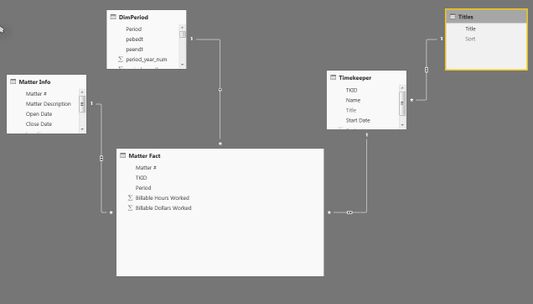 Data model
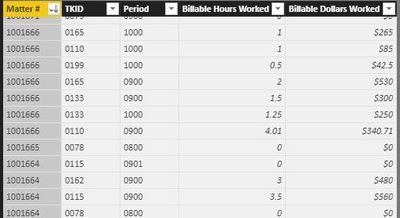 Fact
Fact
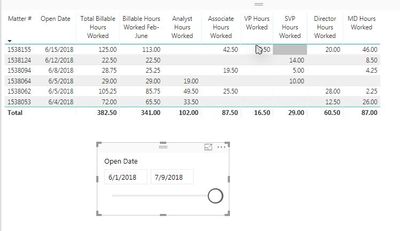 Visual
DimMatterInfo (Matter # is primary key)
DimTimekeeper (TKID is primary key)
DimTitle (Title is primary key)
Measures that are working:
[Total Billable Hours Worked] = SUM( 'Matter Fact'[Billable Hours Worked] )
[Billable Hours Worked Feb-June] =
CALCULATE(
[Total Billable Hours Worked],
DimPeriod[period_month_num] >= 2 && DimPeriod[period_month_num] <= 6
)
[Analyst Hours Worked] =
CALCULATE (
[Total Billable Hours Worked],
Timekeeper[Title] = "Analyst"
)
The key requirement, and what's tripping me up, is that I only want to run metrics on matters with [Total Billable Hours Worked Feb-June] > 20. I've achieved this on the visual using the visual level filter on the table shown above.
What I'm trying to write is a measure that calculates average Analyst Hours Per Job, subject to the overall limitation that the [Total Billable Hours Worked] > 20. So in the above example, the measure would be: (19.0 + 49.5 + 33.5) / 3 = 34.0. Basically, I need a formula that returns "3" for the non-blank analyst rows, subject to the [Total Billable Hours Worked Feb-June] > 20 limitation.
I'm ultimately not going to show the [Total Billable Hours Worked Feb-June] on the table -- it's just needed for a filter.
Any help would be greatly appreciated!


