cancel
Showing results for 
Search instead for 
Did you mean: 

Get Fabric Certified for FREE during Fabric Data Days. Don't miss your chance! Request now

Reply
jtownsend21
Responsive Resident
Responsive Resident

Column Based on Values From a Measure

I think this is simple, but I cannot figure it out. 

I have 2 tables. The first table is my User Table (see example below): 


Employee Table.PNG


Then I have a Revenue table (see example below): 
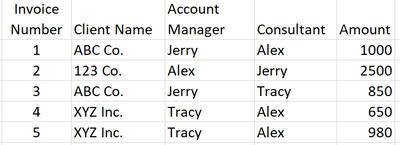
Invoice Table.PNG


The goal is to have a slicer (or filter) from the employee table such that when I select an employee it will give me the total amount for that employee whether they are the Account Manager or Consultant. For example if I select Tracy, it would produce the following: 
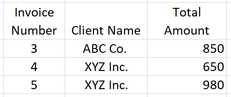
 

Results.PNG


I have attempted to use a combination of a measure and a column to accomplish this. 

The measure would always show the selected employee's name when filtered as follows (this works perfectly)

Dynamic Employee Measure = 
IF(
    ISFILTERED('Users Table'[Employee Name]),
    MAX('Users Table'[Employee Name]),
    "No Employee Selected"
)


The column would then look for that name in either the Account Manager column or the Consultant column and return that name. The relationship between the Revenue Table and the User Table is based on this column. This one is the one that isn't working. 

Dynamic Employee Column = 
IF(
    OR(
    [Dynamic Employee Measure] = Revenue[Consultant],
    [Dynamic Employee Measure] = Revenue[Account Manager]),
    [Dynamic Employee Measure],
    "No Employee Selected"
)


Unfortunately, I can't get it to say anything besides the "No Employee Selected"

Thank you in advance for your help! 

1 ACCEPTED SOLUTION
jtownsend21
Responsive Resident
Responsive Resident

Someone else helped me figure this out. I can't take credit. The key was to remove the relationship and use the following measure. 

Measure =
CALCULATE (
    SUM ( 'Table2'[Amount] ),
    FILTER (
        'Table2',
        'Table2'[Account Manager] = SELECTEDVALUE ( Table1[Employee] )
            || 'Table2'[Consultant] = SELECTEDVALUE ( Table1[Employee] )
    )
)

View solution in original post

5 REPLIES 5
jtownsend21
Responsive Resident
Responsive Resident

Someone else helped me figure this out. I can't take credit. The key was to remove the relationship and use the following measure. 

Measure =
CALCULATE (
    SUM ( 'Table2'[Amount] ),
    FILTER (
        'Table2',
        'Table2'[Account Manager] = SELECTEDVALUE ( Table1[Employee] )
            || 'Table2'[Consultant] = SELECTEDVALUE ( Table1[Employee] )
    )
)
Ashish_Mathur
Super User
Super User

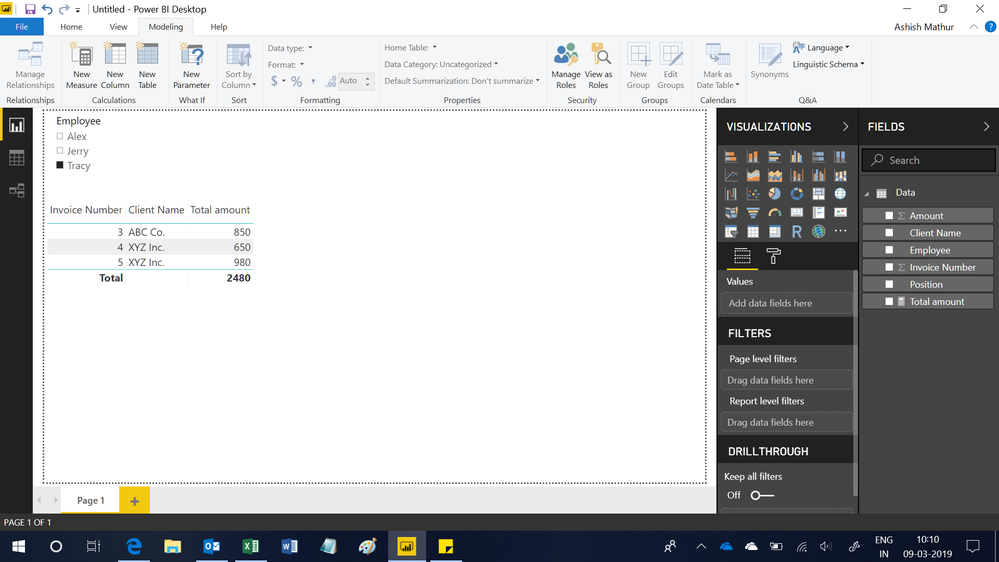
Hi,


You may download my PBI file from here.


Hope this helps.


Untitled.png


Regards,
Ashish Mathur
http://www.ashishmathur.com
https://www.linkedin.com/in/excelenthusiasts/

@Ashish_Mathur This would work if I could restructure the data. Thank you for the help. See the solution below. 

Anonymous
Not applicable

Hi @jtownsend21 


Have you tried creating a relationship on EmployeeId between the two tables using ManageRelationShip under modelling tab in power bi desktop.


Create the slicer of Employees from employeetable.

Then create the table visual from the visualisation pane with the columns from the revenue table.


This will work.


Cheers


CheenuSing

@Anonymous This does not help with the OR statement part of the problem. See Solution below. 

Helpful resources

Announcements
November Power BI Update Carousel

Power BI Monthly Update - November 2025

Check out the November 2025 Power BI update to learn about new features.

Fabric Data Days Carousel

Fabric Data Days

Advance your Data & AI career with 50 days of live learning, contests, hands-on challenges, study groups & certifications and more!

FabCon Atlanta 2026 carousel

FabCon Atlanta 2026

Join us at FabCon Atlanta, March 16-20, for the ultimate Fabric, Power BI, AI and SQL community-led event. Save $200 with code FABCOMM.

Top Solution Authors
Top Kudoed Authors