cancel
Showing results for 
Search instead for 
Did you mean: 

The Power BI Data Visualization World Championships is back! Get ahead of the game and start preparing now! Learn more

Reply
Maryann
Helper I
Helper I

data model

I had my data model formatted exactly how I wanted it, and when I saved , Power Bi reformatted my data model.

Is there a way to turn off auto formatting of the data model ?

thanks

Maryann

1 ACCEPTED SOLUTION

Hi @Maryann ,


By my tests with the latest version of Power BI Desktop, I cannot reproduce your sceanrio.


Please check if you have installed the latest version of Power BI Desktop 2.66.5376.2521.


In addition, do you have this issue for all your pbix files or the specific one?


If you have this issue for the specific pbix file, if it is convenient, could you share a dummy pbix file which can reproduce the issue, so that we can help further investigate on it? You can upload it to OneDrive and post the link here. Do mask sensitive data before uploading.


Best  Regards,

Cherry

Community Support Team _ Cherry Gao
If this post helps, then please consider Accept it as the solution to help the other members find it more quickly.

View solution in original post

6 REPLIES 6
Greg_Deckler
Community Champion
Community Champion

Are you referring to how the tables are laid out on the Relationships tab or ?


Follow on LinkedIn
@ me in replies or I'll lose your thread!!!
Instead of a Kudo, please vote for this idea
Become an expert!: Enterprise DNA
External Tools: MSHGQM
YouTube Channel!: Microsoft Hates Greg
Latest book!:
DAX For Humans

DAX is easy, CALCULATE makes DAX hard...

yes, how the tables are layed out in the relationship tab.

Hi @Maryann ,


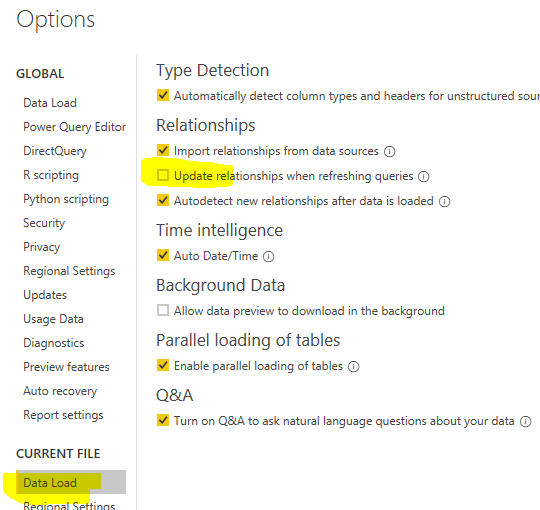
Please check if you have ticked this option. It selected, please unclicked it and try again.


relationship.PNG


Best  Regards,

Cherry

Community Support Team _ Cherry Gao
If this post helps, then please consider Accept it as the solution to help the other members find it more quickly.

it wasn't checked.

Hi @Maryann ,


By my tests with the latest version of Power BI Desktop, I cannot reproduce your sceanrio.


Please check if you have installed the latest version of Power BI Desktop 2.66.5376.2521.


In addition, do you have this issue for all your pbix files or the specific one?


If you have this issue for the specific pbix file, if it is convenient, could you share a dummy pbix file which can reproduce the issue, so that we can help further investigate on it? You can upload it to OneDrive and post the link here. Do mask sensitive data before uploading.


Best  Regards,

Cherry

Community Support Team _ Cherry Gao
If this post helps, then please consider Accept it as the solution to help the other members find it more quickly.

i went back to the original version and duplicated it, then made my change and saved, and my model remained the same.

the time it changed i had done a save as,  I'll accept this as a solution.

thanks

Helpful resources

Announcements
Power BI DataViz World Championships

Power BI Dataviz World Championships

The Power BI Data Visualization World Championships is back! Get ahead of the game and start preparing now!

December 2025 Power BI Update Carousel

Power BI Monthly Update - December 2025

Check out the December 2025 Power BI Holiday Recap!

FabCon Atlanta 2026 carousel

FabCon Atlanta 2026

Join us at FabCon Atlanta, March 16-20, for the ultimate Fabric, Power BI, AI and SQL community-led event. Save $200 with code FABCOMM.