Forum Discussion

Column Based on Values From a Measure
I think this is simple, but I cannot figure it out.
I have 2 tables. The first table is my User Table (see example below):

Then I have a Revenue table (see example below):
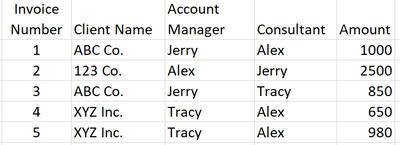
The goal is to have a slicer (or filter) from the employee table such that when I select an employee it will give me the total amount for that employee whether they are the Account Manager or Consultant. For example if I select Tracy, it would produce the following:
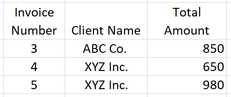
I have attempted to use a combination of a measure and a column to accomplish this.
The measure would always show the selected employee's name when filtered as follows (this works perfectly)
Dynamic Employee Measure =
IF(
    ISFILTERED('Users Table'[Employee Name]),
    MAX('Users Table'[Employee Name]),
    "No Employee Selected"
)
The column would then look for that name in either the Account Manager column or the Consultant column and return that name. The relationship between the Revenue Table and the User Table is based on this column. This one is the one that isn't working.
Dynamic Employee Column =
IF(
    OR(
    [Dynamic Employee Measure] = Revenue[Consultant],
    [Dynamic Employee Measure] = Revenue[Account Manager]),
    [Dynamic Employee Measure],
    "No Employee Selected"
)
Unfortunately, I can't get it to say anything besides the "No Employee Selected"
Thank you in advance for your help!
Someone else helped me figure this out. I can't take credit. The key was to remove the relationship and use the following measure.
Measure =
CALCULATE (
    SUM ( 'Table2'[Amount] ),
    FILTER (
        'Table2',
        'Table2'[Account Manager] = SELECTEDVALUE ( Table1[Employee] )
            || 'Table2'[Consultant] = SELECTEDVALUE ( Table1[Employee] )
    )
)

5 Replies
- Ashish_MathurSuper User
- jtownsend21Responsive Resident
Ashish_Mathur This would work if I could restructure the data. Thank you for the help. See the solution below.
 AnonymousNot applicable
Hi jtownsend21
Have you tried creating a relationship on EmployeeId between the two tables using ManageRelationShip under modelling tab in power bi desktop.
Create the slicer of Employees from employeetable.
Then create the table visual from the visualisation pane with the columns from the revenue table.
This will work.
Cheers
CheenuSing
- jtownsend21Responsive Resident
Anonymous This does not help with the OR statement part of the problem. See Solution below.
- jtownsend21Responsive Resident
Someone else helped me figure this out. I can't take credit. The key was to remove the relationship and use the following measure.
Measure =
CALCULATE (
    SUM ( 'Table2'[Amount] ),
    FILTER (
        'Table2',
        'Table2'[Account Manager] = SELECTEDVALUE ( Table1[Employee] )
            || 'Table2'[Consultant] = SELECTEDVALUE ( Table1[Employee] )
    )
)
