Get certified for free when you join Fabric Data Days 2026 and dive into Fabric, Power BI, SQL, AI, and other essential data skills.
Join nowTry your skills in the Power BI Dataviz World Championship! Round one ends June 26. Join now
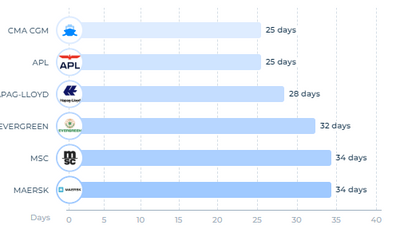
Does powerBI provides any visuals that I can click on bar and sub bar could open?
such as this,
after click on CMA CGM,
My question are,
How to call this kind of chart?
Does PowerBI provides any this kind of direct visual?
If not, is it anyway I can setup this kind of visual?
Also please share any link if you have,
Thank you for your time.
Hello.
I see 2 options for this problem:
1. Create a page tooltip for the chart.
Explore it here: https://learn.microsoft.com/en-us/power-bi/create-reports/desktop-tooltips?tabs=powerbi-desktop
2. Use drillthrough.
Explore it here: https://learn.microsoft.com/en-us/power-bi/create-reports/desktop-drillthrough
If you think it works for your problem and need further help just let me know 🙂
Hello @JorgePinho Thank you for your reply.
I think drillthrough/tooltip both will not gonna be helpful for my situation.
Because, I look for a solution which can open top three nested bars.
for example, in main bar chart i would have sealines info. if I click on specifc sealine (CMA CGM), it should open top three containers of that. Also I am looking clickable containers bar so I can filter dash.
If you want the containers to be clickable, then my solutions don't fit that criteria.
Unfortunately I can't think of anything else.
| User | Count |
|---|---|
| 23 | |
| 19 | |
| 19 | |
| 17 | |
| 11 |
| User | Count |
|---|---|
| 55 | |
| 55 | |
| 41 | |
| 40 | |
| 30 |