This is best Fabric, Power BI, SQL and AI community event. How do we know? The last event sold out! Save €200 with code FABCMTY200.
Register nowA new Data Days event is coming soon! This time we’re going bigger than ever. Fabric, Power BI, SQL, AI and more. Don't miss out.
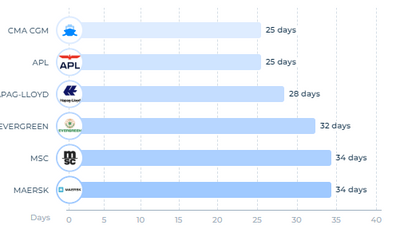
Does powerBI provides any visuals that I can click on bar and sub bar could open?
such as this,
after click on CMA CGM,
My question are,
How to call this kind of chart?
Does PowerBI provides any this kind of direct visual?
If not, is it anyway I can setup this kind of visual?
Also please share any link if you have,
Thank you for your time.
Hello.
I see 2 options for this problem:
1. Create a page tooltip for the chart.
Explore it here: https://learn.microsoft.com/en-us/power-bi/create-reports/desktop-tooltips?tabs=powerbi-desktop
2. Use drillthrough.
Explore it here: https://learn.microsoft.com/en-us/power-bi/create-reports/desktop-drillthrough
If you think it works for your problem and need further help just let me know 🙂
Hello @JorgePinho Thank you for your reply.
I think drillthrough/tooltip both will not gonna be helpful for my situation.
Because, I look for a solution which can open top three nested bars.
for example, in main bar chart i would have sealines info. if I click on specifc sealine (CMA CGM), it should open top three containers of that. Also I am looking clickable containers bar so I can filter dash.
If you want the containers to be clickable, then my solutions don't fit that criteria.
Unfortunately I can't think of anything else.
Sign up to receive a private message when registration opens and key events begin.
If you have recently started exploring Fabric, we'd love to hear how it's going. Your feedback can help with product improvements.
| User | Count |
|---|---|
| 32 | |
| 26 | |
| 23 | |
| 20 | |
| 15 |
| User | Count |
|---|---|
| 64 | |
| 41 | |
| 28 | |
| 22 | |
| 22 |