cancel
Showing results for 
Search instead for 
Did you mean: 

We've captured the moments from FabCon & SQLCon that everyone is talking about, and we are bringing them to the community, live and on-demand. Starts on April 14th. Register now

Reply
adamlang
Helper III
Helper III

Cleaning UK Postcode data

Hi there,


Does anyone have any experience cleaning UK postcodes is Power BI, Power Query, DAX? Maybe there's some standard code that could be used?


I have a list of client postcodes that need to link to other tables to be categorised. However, some of the data is a bit messy:


- The main issue is some postcodes have a double space in the middle where there should only be one. e.g. AA1  1AA should be AA1 1AA.

- Other issues include trimming out spaces at the end, ensuring capitalisation, removing charaters that should not be there - , etc. but that's relatively simple with Trim and Clean.

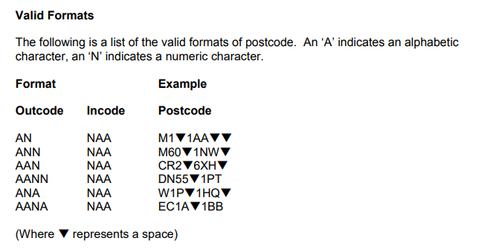
- a more complex issue is that some postcodes are missing the space entirely. Its not many however and I might be able to live with it This will be hard to resolve because uk postcodes come in different formats:


adamlang_0-1698487956955.png


I won't have any spaces at the end, but getting the space in the middle, in the right place, where non exists already, seems quite hard.


I wondered, does anyone have some standard code for cleaning UK Postcodes, seems like quite a common task I would think?


Or can at least suggest how to remove the double space in the middle, and replace with only a single space.


Many thanks,


Adam

1 ACCEPTED SOLUTION
HotChilli
Community Champion
Community Champion

to remove the double space in the middle - Using Power Query. Right-click, Replace Values. Enter 2 spaces, replace with 1 space.

--


Maybe you can solve all problems by splitting column by 3 characters on right.  Clean and trim all data. Then combine columns with a space in between.  These are all done with the interface


View solution in original post

2 REPLIES 2
HotChilli
Community Champion
Community Champion

to remove the double space in the middle - Using Power Query. Right-click, Replace Values. Enter 2 spaces, replace with 1 space.

--


Maybe you can solve all problems by splitting column by 3 characters on right.  Clean and trim all data. Then combine columns with a space in between.  These are all done with the interface


@HotChilli 

Thanks! The Replace values worked a treat. Just like find and replace in excel.


I'll see if I can get other other solution to work over the next day or so.


Thanks.

Helpful resources

Announcements
New to Fabric survey Carousel

New to Fabric Survey

If you have recently started exploring Fabric, we'd love to hear how it's going. Your feedback can help with product improvements.

Power BI DataViz World Championships carousel

Power BI DataViz World Championships - June 2026

A new Power BI DataViz World Championship is coming this June! Don't miss out on submitting your entry.

Join our Fabric User Panel

Join our Fabric User Panel

Share feedback directly with Fabric product managers, participate in targeted research studies and influence the Fabric roadmap.

March Power BI Update Carousel

Power BI Community Update - March 2026

Check out the March 2026 Power BI update to learn about new features.