cancel
Showing results for 
Search instead for 
Did you mean: 

Try your skills in the Power BI Dataviz World Championship! Round one ends June 26. Join now

Reply
Anonymous
Not applicable

Check highest value for multiple fields

I'm working on a requirement to find the highest value out of the Quarter & Name using a Result value to check. I've managed to get it to work to an extent, by which it looks at the highest value per quarter out of all the filtered names but this isn't what I'm after.


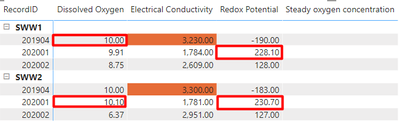
Rather than this, the idea is to show the highest value per quarter for each name rather than the highest overall. Below is what the expectation is (you can see I've used a red box to show the highest value)


lxtrxi_0-1598440923042.png


The code I have to date is:

CopyCheckMinMax = 
VAR temp_table =
    SUMMARIZE (
        ALLSELECTED (
            Table1[Quarter],
            Table1[Name]
        ),Table1[Event Log], Table1[Name],
        "@Total", SUM ( Table1[Result] )
    )
RETURN
    IF (
        MAXX (
            temp_table,
            [@Total]
        )
            = SUM ( Table1[Result] ),
        1,
        0
    )

Using conditional formatting rules, if the value is 1 then it will be highlighted as such. I believe I need to incorporate the Name somewhere into this but I am not sure where?

1 ACCEPTED SOLUTION
mahoneypat
Microsoft Employee
Microsoft Employee

Please try this approach


IsHighest =
VAR thisresult =
SUM ( Table1[Result] )
VAR quartermax =
MAXX ( ALLSELECTED ( Table1[Quarter] ), CALCULATE ( SUM ( Table1[Result] ) ) )
RETURN
IF ( thisresult = quartermax, 1, 0 )


If this works for you, please mark it as the solution.  Kudos are appreciated too.  Please let me know if not.

Regards,

Pat


Did I answer your question? Mark my post as a solution! Kudos are also appreciated!

To learn more about Power BI, follow me on Twitter or subscribe on YouTube.


@mahoneypa HoosierBI on YouTube


View solution in original post

4 REPLIES 4
mahoneypat
Microsoft Employee
Microsoft Employee

Please try this approach


IsHighest =
VAR thisresult =
SUM ( Table1[Result] )
VAR quartermax =
MAXX ( ALLSELECTED ( Table1[Quarter] ), CALCULATE ( SUM ( Table1[Result] ) ) )
RETURN
IF ( thisresult = quartermax, 1, 0 )


If this works for you, please mark it as the solution.  Kudos are appreciated too.  Please let me know if not.

Regards,

Pat


Did I answer your question? Mark my post as a solution! Kudos are also appreciated!

To learn more about Power BI, follow me on Twitter or subscribe on YouTube.


@mahoneypa HoosierBI on YouTube


Anonymous
Not applicable

That's the one, legend!

amitchandak
Super User
Super User

@Anonymous , I think you need to replace qtr with with month , then on top of month it will give max


CopyCheckMinMax = 
VAR temp_table =
    SUMMARIZE (
        ALLSELECTED (
            Table1[Month],
            Table1[Name]
        ),Table1[Event Log], Table1[Name],
        "@Total", SUM ( Table1[Result] )
    )
RETURN
    IF (
        MAXX (
            temp_table,
            [@Total]
        )
            = SUM ( Table1[Result] ),
        1,
        0
    )
Share with Power BI Enthusiasts: Full Power BI Video (20 Hours) YouTube
Microsoft Fabric Series 60+ Videos YouTube
Microsoft Fabric Hindi End to End YouTube
Anonymous
Not applicable

Hi @amitchandak thanks for you reply. There isn't a Month to choose from unfortunately so this wouldn't work.

Helpful resources

Announcements
Fabric Data Days is here Carousel

Fabric Data Days 2026

Don't miss out on Data Days, June 15 through August 7. Learn Fabric, Power BI, SQL, AI and more.

May Power BI Update Carousel

Power BI Monthly Update - May 2026

Check out the May 2026 Power BI update to learn about new features.

Power BI DataViz World Championships carousel

Power BI DataViz World Championships - June 2026

A new Power BI DataViz World Championship is coming this June! Don't miss out on submitting your entry.