
This time we’re going bigger than ever. Fabric, Power BI, SQL, AI and more. We're covering it all. You won't want to miss it.
Learn moreDid you hear? There's a new SQL AI Developer certification (DP-800). Start preparing now and be one of the first to get certified. Register now
Hi Guys,
i have to check before exporting to PDF if dataset report was refreshed sucessfully.
i have found this method:
GET https://api.powerbi.com/v1.0/myorg/datasets/{datasetId}/refreshes/{refreshId}
but from where i have to know RefreshId (i want to take last refresh status) in order to start exporting report connected to the dataset using API and powershell/java?
So steps:
1) refresh dataset connected to report
2) Refresh report AFTER dataset was completely refreshed
Best,
Jacek
Solved! Go to Solution.
Hi @jaryszek
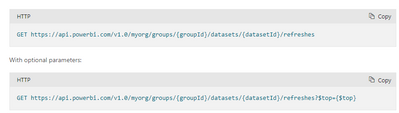
You can get the refresh id directly through the relevant API ,it will return refresh id (request id), the relevant statements refer to this document:
Datasets - Get Refresh History In Group - REST API (Power BI Power BI REST APIs) | Microsoft Docs
Best regards,
Community Support Team Selina zhu
If this post helps, then please consider Accept it as the solution to help the other members find it more quickly
Check below link to see power bi refresh every second using API.
https://thetrendsettershub.blogspot.com/2023/08/power-bi-tips-api-refresh.html
Hi @jaryszek
You can get the refresh id directly through the relevant API ,it will return refresh id (request id), the relevant statements refer to this document:
Datasets - Get Refresh History In Group - REST API (Power BI Power BI REST APIs) | Microsoft Docs
Best regards,
Community Support Team Selina zhu
If this post helps, then please consider Accept it as the solution to help the other members find it more quickly
@Anonymous thank you.
It will take last refresh ? How to make this working in the loop in powershell?
Best,
Jacek
Hi @jaryszek ,
It will take all record of your refresh history.
What do you mean by loops?
If this post helps, then please consider Accept it as the solution to help the other members find it more quickly
Best regards.
@selinaz thank you i figured this out. The top is taking the last refreshed one and this is working fine 🙂
Hi,
Anybody can help?
Best,
Jacek
Check out the April 2026 Power BI update to learn about new features.
Sign up to receive a private message when registration opens and key events begin.
If you have recently started exploring Fabric, we'd love to hear how it's going. Your feedback can help with product improvements.
| User | Count |
|---|---|
| 36 | |
| 33 | |
| 31 | |
| 21 | |
| 16 |
| User | Count |
|---|---|
| 66 | |
| 55 | |
| 31 | |
| 24 | |
| 23 |