
cancel
Showing results for 
Search instead for 
Did you mean: 

July 7 - July 17 | Round 2 of the Power BI Dataviz World Championships. Don't miss your chance! Learn more

Reply
jaryszek
Super User
Super User

Check dataset refresh status REST API

Hi Guys,


i have to check before exporting to PDF if dataset report was refreshed sucessfully.

i have found this method:


GET https://api.powerbi.com/v1.0/myorg/datasets/{datasetId}/refreshes/{refreshId}


but from where i have to know RefreshId (i want to take last refresh status) in order to start exporting report connected to the dataset using API and powershell/java?

So steps:
1) refresh dataset connected to report
2) Refresh report AFTER dataset was completely refreshed

Best,
Jacek

1 ACCEPTED SOLUTION
Anonymous
Not applicable

Hi @jaryszek


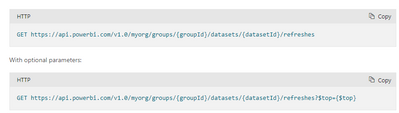
You can get the refresh id directly through the relevant API ,it will return refresh id (request id), the relevant statements refer to this document:

Datasets - Get Refresh History In Group - REST API (Power BI Power BI REST APIs) | Microsoft Docs


vmengzhumsft_0-1659520033595.png


Best regards, 

Community Support Team Selina zhu 

If this post helps, then please consider Accept it as the solution to help the other members find it more quickly 

View solution in original post

6 REPLIES 6
Mohit_Chhabra
Regular Visitor

Check below link to see power bi refresh every second using API. 

https://thetrendsettershub.blogspot.com/2023/08/power-bi-tips-api-refresh.html

Anonymous
Not applicable

Hi @jaryszek


You can get the refresh id directly through the relevant API ,it will return refresh id (request id), the relevant statements refer to this document:

Datasets - Get Refresh History In Group - REST API (Power BI Power BI REST APIs) | Microsoft Docs


vmengzhumsft_0-1659520033595.png


Best regards, 

Community Support Team Selina zhu 

If this post helps, then please consider Accept it as the solution to help the other members find it more quickly 

@Anonymous thank you.

It will take last refresh ? How to make this working in the loop in powershell?

Best,
Jacek

Hi @jaryszek ,


It will take all record of your refresh history.

selinaz_0-1660119728724.png

What do you mean by loops?


If this post helps, then please consider Accept it as the solution to help the other members find it more quickly

Best regards.

@selinaz  thank you i figured this out. The top is taking the last refreshed one and this is working fine 🙂

jaryszek
Super User
Super User

Hi,

Anybody can help?
Best,
Jacek

Helpful resources

Announcements
FabCon and SQLCon Barcelona 2026

FabCon & SQLCon – Barcelona 2026

Join us in Barcelona for FabCon and SQLCon, the Fabric, Power BI, SQL, and AI community event. Save €200 with code FABCMTY200.

60 days of Data Days Carousel

Data Days 2026

Join Fabric Data Days 2026: 60 days of free live/on-demand sessions, challenges, study groups, and certification opportunities.

Power BI DataViz World Championships carousel

Power BI DataViz World Championships - June 2026

A new Power BI DataViz World Championship is coming this June! Don't miss out on submitting your entry.