Join us at FabCon Atlanta from March 16 - 20, 2026, for the ultimate Fabric, Power BI, AI and SQL community-led event. Save $200 with code FABCOMM.
Register now!The Power BI Data Visualization World Championships is back! It's time to submit your entry. Live now!
Hi guys,
I have a table called "flancamento" and I would like to find duplicate rows.
I thought of a solution that would return duplicate values in a new column.
Then I am creating a calculated column and I am using the following function, but maybe I need to add more parameters:
Duplicados = IF(
COUNTROWS(
FILTER(fLancamento,fLancamento[Lançamento]=
EARLIER(fLancamento[Lançamento])))>1,1,BLANK()
)
How could I achieve this result?
Thanks,
Karina
Hi @karinafreitass ,
You can achieve it using Power Query or create a calculated column to achieve it, please find all details in the following blogs.
Identify Duplicates Using Power Query
Identify duplicates and show up records
Best Regards
Rena
Community Support Team _ Rena Ruan
If this post helps, then please consider Accept it as the solution to help the other members find it more.
@karinafreitass , Your formula seems fine. Hope you are creating a new column.
You can have new column like
if( countx(filter(fLancamento,fLancamento[Lançamento] =EARLIER(fLancamento[Lançamento])),fLancamento[Lançamento]) >1 , 1, blank())
New measure like
if( countx(filter(allselected(fLancamento),fLancamento[Lançamento] =EARLIER(fLancamento[Lançamento])),fLancamento[Lançamento]) >1 , 1, blank())
Please provide your feedback comments and advice for new videos
Tutorial Series Dax Vs SQL Direct Query PBI Tips
Appreciate your Kudos.
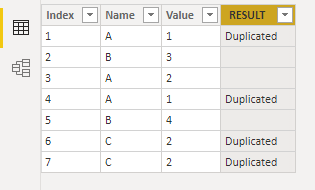
Hi, @karinafreitass , you might want to try this measure in a calculated column
RESULT = IF ( CALCULATE ( COUNTROWS ( flancamento ), ALL ( flancamento[Index] ) ) > 1, "Duplicated" )
flancamento[Index] is the first column in your dataset with cardinal numbers 1, 2, 3 ...
| Thanks to the great efforts by MS engineers to simplify syntax of DAX! Most beginners are SUCCESSFULLY MISLED to think that they could easily master DAX; but it turns out that the intricacy of the most frequently used RANKX() is still way beyond their comprehension! |
DAX is simple, but NOT EASY! |
Thanks for help.
I've identified a problem. In the visual (table) I identified that the power Bi is generating duplicity as 1 record only and is making the sum of the values. So there's not going to be duplicate values, and that's not cool.
I need to identify if there are duplicate records in the entire row
The Power BI Data Visualization World Championships is back! It's time to submit your entry.
Check out the January 2026 Power BI update to learn about new features.
| User | Count |
|---|---|
| 61 | |
| 47 | |
| 39 | |
| 23 | |
| 23 |
| User | Count |
|---|---|
| 144 | |
| 106 | |
| 63 | |
| 38 | |
| 31 |