Join the FabCon + SQLCon recap series. Up next: Power BI, Real-Time Intelligence, IQ and AI, and Data Factory take center stage. All sessions are available on-demand after the live show. Register now
Hi
Im trying to convert a SQL CASE statement to DAX IF . Lets say I have a column of values like:
ProjectCode |
D-IREE00215 |
BADR0022 |
| A-DD1255 |
and part of the query is as follows:
CASE
WHEN LEFT(ProjectCode,4) LIKE '%[a-z]%' AND SUBSTRING(ProjectCode,5,4) LIKE '%[0-9]%'
How do I write this in DAX so that the only field returned will be BADR0022
Solved! Go to Solution.
Hi @VistaDee ,
Here are the steps you can follow:
1. Create calculated column
flag =
var _1={"A","B","C","D","E","F","G","H","I","J","K","M","L","N","O","P","Q","R","S","T","U","V","W","X","Y","Z"}
VAR _2={0,1,2,3,4,5,6,7,8,9}
var _5=IF(ISERROR(VALUE(MID('Table'[column],5,1))),BLANK(),VALUE(MID('Table'[column],5,1)))
var _6=IF(ISERROR(VALUE(MID('Table'[column],5,1))),BLANK(),VALUE(MID('Table'[column],6,1)))
var _7=IF(ISERROR(VALUE(MID('Table'[column],5,1))),BLANK(),VALUE(MID('Table'[column],7,1)))
var _8=IF(ISERROR(VALUE(MID('Table'[column],5,1))),BLANK(),VALUE(MID('Table'[column],8,1)))
RETURN
IF(LEFT('Table'[column],1) IN _1&&MID('Table'[column],2,1) IN _1&&MID('Table'[column],3,1) IN _1&&MID('Table'[column],4,1) IN _1&&
_5 IN _2 && _6 IN _2 && _7 IN _2 &&_8 IN _2,
'Table'[column],BLANK()
)
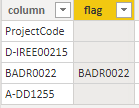
2. Result.
You can downloaded PBIX file from here.
Best Regards,
Liu Yang
If this post helps, then please consider Accept it as the solution to help the other members find it more quickly.
Hi @VistaDee ,
Here are the steps you can follow:
1. Create calculated column
flag =
var _1={"A","B","C","D","E","F","G","H","I","J","K","M","L","N","O","P","Q","R","S","T","U","V","W","X","Y","Z"}
VAR _2={0,1,2,3,4,5,6,7,8,9}
var _5=IF(ISERROR(VALUE(MID('Table'[column],5,1))),BLANK(),VALUE(MID('Table'[column],5,1)))
var _6=IF(ISERROR(VALUE(MID('Table'[column],5,1))),BLANK(),VALUE(MID('Table'[column],6,1)))
var _7=IF(ISERROR(VALUE(MID('Table'[column],5,1))),BLANK(),VALUE(MID('Table'[column],7,1)))
var _8=IF(ISERROR(VALUE(MID('Table'[column],5,1))),BLANK(),VALUE(MID('Table'[column],8,1)))
RETURN
IF(LEFT('Table'[column],1) IN _1&&MID('Table'[column],2,1) IN _1&&MID('Table'[column],3,1) IN _1&&MID('Table'[column],4,1) IN _1&&
_5 IN _2 && _6 IN _2 && _7 IN _2 &&_8 IN _2,
'Table'[column],BLANK()
)
2. Result.
You can downloaded PBIX file from here.
Best Regards,
Liu Yang
If this post helps, then please consider Accept it as the solution to help the other members find it more quickly.
Hi @VistaDee
Download sample PBIX with the following code
I understand the SQL code but could you achieve the same thing by checking that the string does not contain a - ?
To create a column n DAX this would be
Column = IF(NOT(CONTAINSSTRING('Table1'[ProjectCode], "-")),'Table1'[ProjectCode])
However this is creating a new column in your data model and that might not be what you want as a lot of the column fields will be empty.
If you want to do it a a measure use this
Measure = IF(NOT(CONTAINSSTRING(SELECTEDVALUE('Table1'[ProjectCode]), "-")),SELECTEDVALUE('Table1'[ProjectCode]))
What exactly is the end result you want? A new column? A measure? Or just some code to use elsewhere?
Regards
Phil
Proud to be a Super User!
Check out the April 2026 Power BI update to learn about new features.
If you have recently started exploring Fabric, we'd love to hear how it's going. Your feedback can help with product improvements.
A new Power BI DataViz World Championship is coming this June! Don't miss out on submitting your entry.
| User | Count |
|---|---|
| 39 | |
| 37 | |
| 31 | |
| 22 | |
| 14 |
| User | Count |
|---|---|
| 67 | |
| 58 | |
| 30 | |
| 27 | |
| 25 |