

We've captured the moments from FabCon & SQLCon that everyone is talking about, and we are bringing them to the community, live and on-demand. Starts on April 14th. Register now
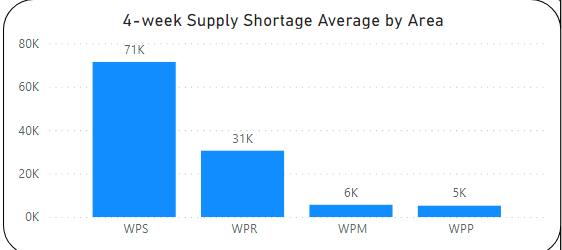
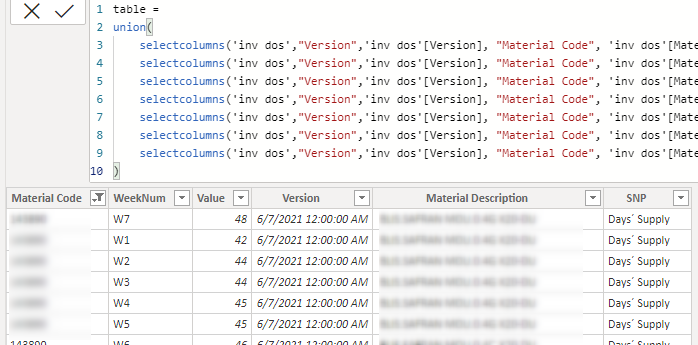
Hi! Below i have a graph, made of measure below which shows 4-w Average. (Material code has relationship with area in another table to be clear). Structure of table is also shown below. Weeks are like from 1 to 78 (W1 - W78). What i would like to accomplish is to make slicer(with slider/zip) that shows range from W1 to last Week and once you pick certain range like W2-W8 it shows average of W2-W8.
Does anyone have any idea how to do it? Is it even possible to do :)?
Thanks in advance!
Solved! Go to Solution.
@hejszyszki
You need to create another column in this table to extract the week number.
WeekNumber = INT(SUBSTITUTE(Table12[WeekNum],"W",""))
Then, you can use below measure and make sure you have slicer on the WeekNumber to select the range:
measure =
VAR __minweekno =
MIN ( 'invo dos'[WeekNumber] )
VAR __maxnweekno =
MAX ( 'invo dos'[WeekNumber] )
RETURN
SUMX (
FILTER (
'invo dos',
'invo dos'[SNP Plan] = "Short Supply"
&& 'invo dos'[WeekNumber] >= __minweekno
&& 'invo dos'[WeekNumber] <= __maxnweeknow
),
'invo dos'[Value]
)
Note: If your data expands into more than one year then you will have to add (Year + weekNumber )
⭕ Subscribe and learn Power BI from these videos
⚪ Website ⚪ LinkedIn ⚪ PBI User Group
@hejszyszki
The best approach to your problem is to unpivot your Weeks into two columns as follows
Material Code, Desc, SNP Plan, Week, Value
Refer to these videos on UnPivot: https://www.youtube.com/watch?v=Vff2kRBM95o&t=0s
⭕ Subscribe and learn Power BI from these videos
⚪ Website ⚪ LinkedIn ⚪ PBI User Group
Ended up with something like this. Stuck when trying to create slicer of average of picked range.
Thanks in advance!
@hejszyszki
You need to create another column in this table to extract the week number.
WeekNumber = INT(SUBSTITUTE(Table12[WeekNum],"W",""))
Then, you can use below measure and make sure you have slicer on the WeekNumber to select the range:
measure =
VAR __minweekno =
MIN ( 'invo dos'[WeekNumber] )
VAR __maxnweekno =
MAX ( 'invo dos'[WeekNumber] )
RETURN
SUMX (
FILTER (
'invo dos',
'invo dos'[SNP Plan] = "Short Supply"
&& 'invo dos'[WeekNumber] >= __minweekno
&& 'invo dos'[WeekNumber] <= __maxnweeknow
),
'invo dos'[Value]
)
Note: If your data expands into more than one year then you will have to add (Year + weekNumber )
⭕ Subscribe and learn Power BI from these videos
⚪ Website ⚪ LinkedIn ⚪ PBI User Group
If you have recently started exploring Fabric, we'd love to hear how it's going. Your feedback can help with product improvements.
A new Power BI DataViz World Championship is coming this June! Don't miss out on submitting your entry.
Share feedback directly with Fabric product managers, participate in targeted research studies and influence the Fabric roadmap.
| User | Count |
|---|---|
| 57 | |
| 38 | |
| 33 | |
| 19 | |
| 16 |
| User | Count |
|---|---|
| 68 | |
| 66 | |
| 41 | |
| 34 | |
| 25 |