cancel
Showing results for 
Search instead for 
Did you mean: 

July 7 - July 17 | Round 2 of the Power BI Dataviz World Championships. Don't miss your chance! Learn more

Reply
jgowda
New Member

Changing Data Source

It is possible to adjust the data source of a power BI report from any level higher than Power BI Desktop? Can I change the source from when a report is published or published to web? Is there any way to adjust what data source my report pulls from based on some parameters when the report is opened, either on app.powerbi or on publish to web?


Thanks

Jethin

2 ACCEPTED SOLUTIONS
v-frfei-msft
Community Support
Community Support

Hi @jgowda,


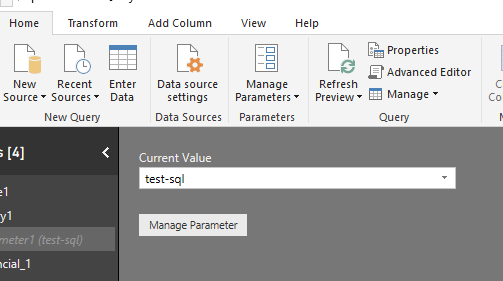
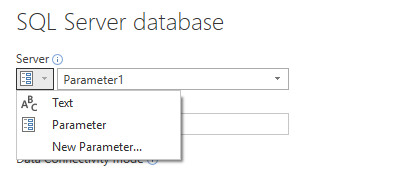
Based on my test, We cannot change data source of a report from Power BI service. Here we can use parameter to change data source.

Then we can get data using the Parameter that we created. In power query we can get different data of different data sources by changing the Current value.For more details, please check the online document.


1.png2.png22.png


Here is the M code for your reference.

let

    Source = Sql.Databases(Parameter1),

    Power_BI_Test = Source{[Name="databasename"]}[Data],

    dbo_Financial_1 = databasename {[Schema="dbo",Item="Financial_1"]}[Data]

in

    dbo_Financial_1


Regards,

Frank

Community Support Team _ Frank
If this post helps, then please consider Accept it as the solution to help the others find it more quickly.

View solution in original post

Hi @jgowda,


Does that make sense? If so, kindly mark my answer as a solution to close the case.


Regards,
Frank

Community Support Team _ Frank
If this post helps, then please consider Accept it as the solution to help the others find it more quickly.

View solution in original post

4 REPLIES 4
v-frfei-msft
Community Support
Community Support

Hi @jgowda,


Based on my test, We cannot change data source of a report from Power BI service. Here we can use parameter to change data source.

Then we can get data using the Parameter that we created. In power query we can get different data of different data sources by changing the Current value.For more details, please check the online document.


1.png2.png22.png


Here is the M code for your reference.

let

    Source = Sql.Databases(Parameter1),

    Power_BI_Test = Source{[Name="databasename"]}[Data],

    dbo_Financial_1 = databasename {[Schema="dbo",Item="Financial_1"]}[Data]

in

    dbo_Financial_1


Regards,

Frank

Community Support Team _ Frank
If this post helps, then please consider Accept it as the solution to help the others find it more quickly.
Anonymous
Not applicable

Hi Chnage server name via parameter is I am able to do but I can't change the Schema name. Could you please help me on this? Please see my question here: https://community.powerbi.com/t5/Desktop/Schema-change-to-multiple-queries-SAP-hana-and-Direct-query...

Hi @jgowda,


Does that make sense? If so, kindly mark my answer as a solution to close the case.


Regards,
Frank

Community Support Team _ Frank
If this post helps, then please consider Accept it as the solution to help the others find it more quickly.
jgowda
New Member

It is possible to adjust the data source of a power BI report from any level higher than Power BI Desktop? Can I change the source from when a report is published or published to web? Is there any way to adjust what data source my report pulls from based on some parameters when the report is opened, either on app.powerbi or on publish to web?


Thanks

Jethin

Helpful resources

Announcements
FabCon and SQLCon Barcelona 2026

FabCon & SQLCon – Barcelona 2026

Join us in Barcelona for FabCon and SQLCon, the Fabric, Power BI, SQL, and AI community event. Save €200 with code FABCMTY200.

60 days of Data Days Carousel

Data Days 2026

Join Fabric Data Days 2026: 60 days of free live/on-demand sessions, challenges, study groups, and certification opportunities.

Power BI DataViz World Championships carousel

Power BI DataViz World Championships - June 2026

A new Power BI DataViz World Championship is coming this June! Don't miss out on submitting your entry.