Get certified for free when you join Fabric Data Days 2026 and dive into Fabric, Power BI, SQL, AI, and other essential data skills.
Join nowJuly 7 - July 17 | Round 2 of the Power BI Dataviz World Championships. Don't miss your chance! Learn more
Hello,
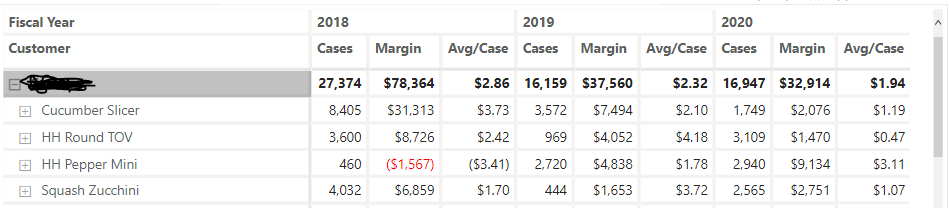
I have a matrix that I am trying to change to meet a particular format. What I would like is to show:
Cases
18/19/20
Then
Margin
18/19/20
then Avg/Case
18/19/20
Is there a way to adjust this?
Solved! Go to Solution.
Hello @Anonymous
This is not currently available although there is at least one submitted idea for it that you can vote for.
The workaround is to create filtered measures so you would have three measures for each group and you would add each to the matrix in the order you wanted.
2018 Cases = CALCULATE ( [Cases], KEEPFILTERS ( Dates[Fiscal Year] = 2018 ) )2019 Cases = CALCULATE ( [Cases], KEEPFILTERS ( Dates[Fiscal Year] = 2019 ) )2020 Cases = CALCULATE ( [Cases], KEEPFILTERS ( Dates[Fiscal Year] = 2020 ) )
etc.
Not ideal but it will work.
Hello @Anonymous
This is not currently available although there is at least one submitted idea for it that you can vote for.
The workaround is to create filtered measures so you would have three measures for each group and you would add each to the matrix in the order you wanted.
2018 Cases = CALCULATE ( [Cases], KEEPFILTERS ( Dates[Fiscal Year] = 2018 ) )2019 Cases = CALCULATE ( [Cases], KEEPFILTERS ( Dates[Fiscal Year] = 2019 ) )2020 Cases = CALCULATE ( [Cases], KEEPFILTERS ( Dates[Fiscal Year] = 2020 ) )
etc.
Not ideal but it will work.
Join us in Barcelona for FabCon and SQLCon, the Fabric, Power BI, SQL, and AI community event. Save €200 with code FABCMTY200.
Join Fabric Data Days 2026: 60 days of free live/on-demand sessions, challenges, study groups, and certification opportunities.
| User | Count |
|---|---|
| 22 | |
| 22 | |
| 18 | |
| 16 | |
| 13 |
| User | Count |
|---|---|
| 63 | |
| 42 | |
| 40 | |
| 40 | |
| 38 |