Don't miss your chance to take the Fabric Data Engineer (DP-700) exam on us!
Learn moreWe've captured the moments from FabCon & SQLCon that everyone is talking about, and we are bringing them to the community, live and on-demand. Starts on April 14th. Register now
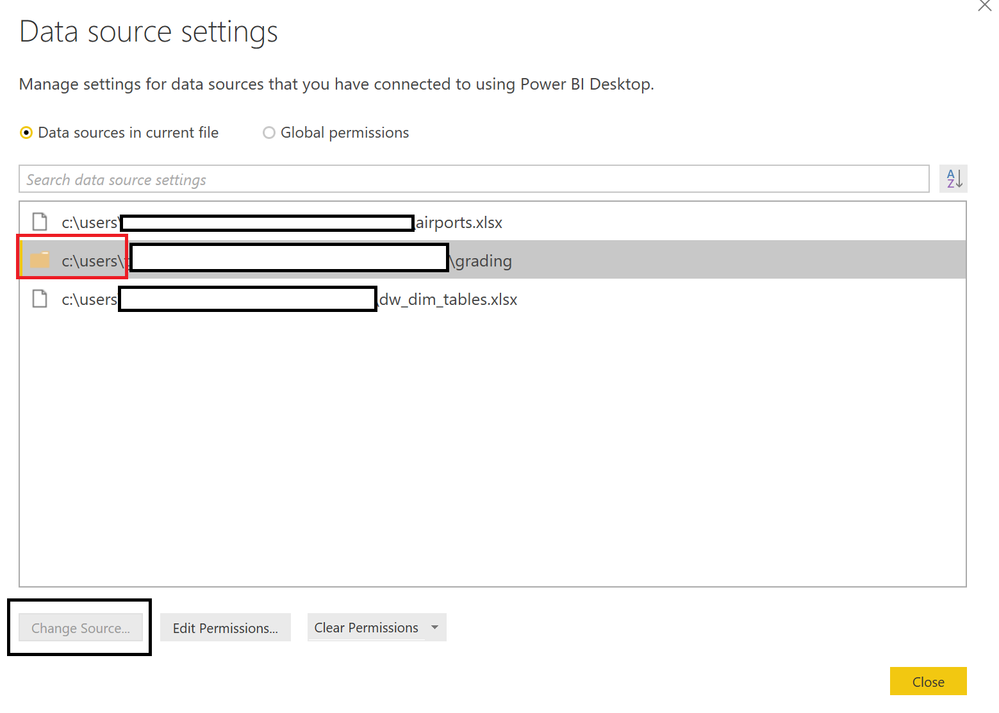
Any ideas why the "Change Data Source" dialogs are no longer working? I can get it to show "Change Source" for a file, but when I attempt to "Change Source" for a directory, the "Change Source" option remains greyed out. This just started happening after I started using the January release (2.54.4970.761 64-bit (January 2018)):
Solved! Go to Solution.
Solved it! I had previously converted my Folder.Files command to Folder.Contents in order to preclude importing sub-directories. Guess I'll have to figure out another way to not import files from sub-directories than using Folder.Contents. Changing it back to Folder.Files allowed the "Change Source" button to highlight... and, all is well again in PowerBI-Land! ![]()
If you have recently started exploring Fabric, we'd love to hear how it's going. Your feedback can help with product improvements.
A new Power BI DataViz World Championship is coming this June! Don't miss out on submitting your entry.
Share feedback directly with Fabric product managers, participate in targeted research studies and influence the Fabric roadmap.
| User | Count |
|---|---|
| 55 | |
| 40 | |
| 36 | |
| 20 | |
| 18 |
| User | Count |
|---|---|
| 73 | |
| 72 | |
| 38 | |
| 35 | |
| 26 |