Learn from the best! Meet the four finalists headed to the FINALS of the Power BI Dataviz World Championships! Register now
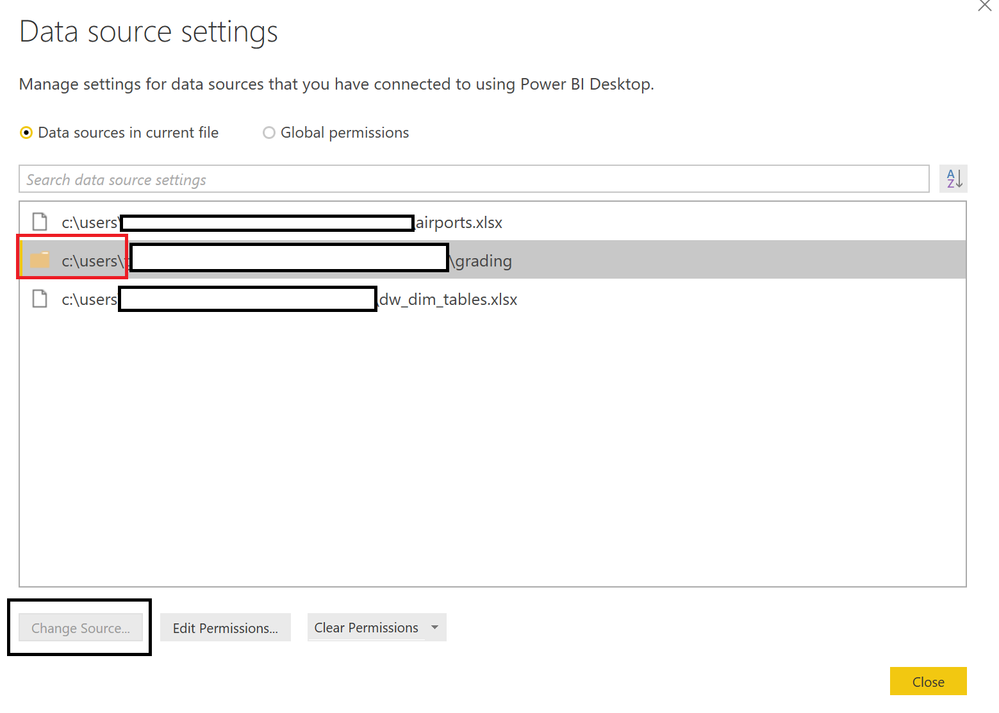
Any ideas why the "Change Data Source" dialogs are no longer working? I can get it to show "Change Source" for a file, but when I attempt to "Change Source" for a directory, the "Change Source" option remains greyed out. This just started happening after I started using the January release (2.54.4970.761 64-bit (January 2018)):
Solved! Go to Solution.
Solved it! I had previously converted my Folder.Files command to Folder.Contents in order to preclude importing sub-directories. Guess I'll have to figure out another way to not import files from sub-directories than using Folder.Contents. Changing it back to Folder.Files allowed the "Change Source" button to highlight... and, all is well again in PowerBI-Land! ![]()
| User | Count |
|---|---|
| 55 | |
| 37 | |
| 23 | |
| 17 | |
| 17 |
| User | Count |
|---|---|
| 69 | |
| 58 | |
| 39 | |
| 21 | |
| 21 |