cancel
Showing results for 
Search instead for 
Did you mean: 

The Power BI Data Visualization World Championships is back! Get ahead of the game and start preparing now! Learn more

Reply
kilala
Resolver I
Resolver I

Categorise by comparing 2 column

Dear all,


In my fact table, I have 2 ID columns(column A and column B) that may have 3 kind of relationship:

1. One-to-One: 1 ID in column A is related to 1 ID in column B

2. One-to-Many:  1 ID in column A is related to many ID in column B

3. Many-to-One:  Many ID in column A is related to one ID in column B.


I need to create another column ( in this case I need to create Measure as I connected to live PBI dataset) , and my expected result would be:


Column AColumn BCategory
A1B11-1
A2B21-M
A2B31-M
A3B4M-1
A4B4M-1


Any tips/ help on how can I achieve this objective? Many thanks!

1 ACCEPTED SOLUTION
Jihwan_Kim
Super User
Super User

Hi,

If you want to check creating a measure, please check the below picture and the attached pbix file.
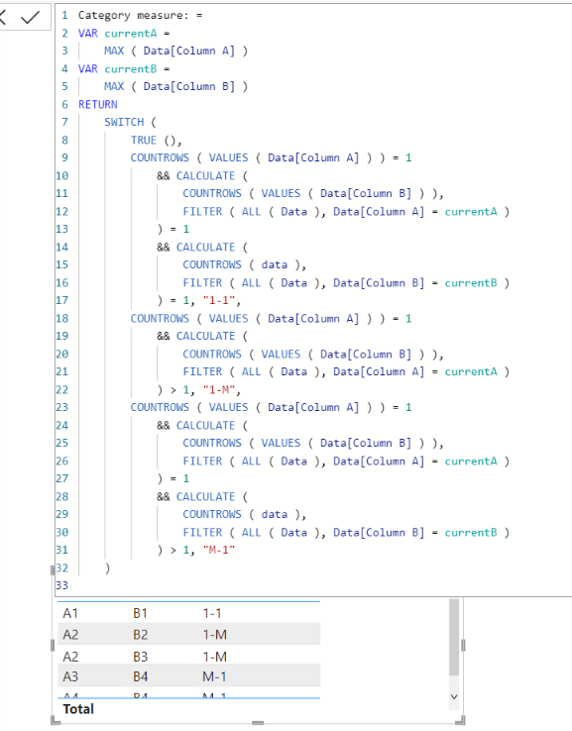
 

Picture1.png


Category measure: =
VAR currentA =
    MAX ( Data[Column A] )
VAR currentB =
    MAX ( Data[Column B] )
RETURN
    SWITCH (
        TRUE (),
        COUNTROWS ( VALUES ( Data[Column A] ) ) = 1
            && CALCULATE (
                COUNTROWS ( VALUES ( Data[Column B] ) ),
                FILTER ( ALL ( Data ), Data[Column A] = currentA )
            ) = 1
            && CALCULATE (
                COUNTROWS ( data ),
                FILTER ( ALL ( Data ), Data[Column B] = currentB )
            ) = 1, "1-1",
        COUNTROWS ( VALUES ( Data[Column A] ) ) = 1
            && CALCULATE (
                COUNTROWS ( VALUES ( Data[Column B] ) ),
                FILTER ( ALL ( Data ), Data[Column A] = currentA )
            ) > 1, "1-M",
        COUNTROWS ( VALUES ( Data[Column A] ) ) = 1
            && CALCULATE (
                COUNTROWS ( VALUES ( Data[Column B] ) ),
                FILTER ( ALL ( Data ), Data[Column A] = currentA )
            ) = 1
            && CALCULATE (
                COUNTROWS ( data ),
                FILTER ( ALL ( Data ), Data[Column B] = currentB )
            ) > 1, "M-1"
    )

If this post helps, then please consider accepting it as the solution to help other members find it faster, and give a big thumbs up.


Click here to visit my LinkedIn page

Click here to schedule a short Teams meeting to discuss your question.

View solution in original post

4 REPLIES 4
Jihwan_Kim
Super User
Super User

Hi,

If you want to check creating a measure, please check the below picture and the attached pbix file.


Picture1.png


Category measure: =
VAR currentA =
    MAX ( Data[Column A] )
VAR currentB =
    MAX ( Data[Column B] )
RETURN
    SWITCH (
        TRUE (),
        COUNTROWS ( VALUES ( Data[Column A] ) ) = 1
            && CALCULATE (
                COUNTROWS ( VALUES ( Data[Column B] ) ),
                FILTER ( ALL ( Data ), Data[Column A] = currentA )
            ) = 1
            && CALCULATE (
                COUNTROWS ( data ),
                FILTER ( ALL ( Data ), Data[Column B] = currentB )
            ) = 1, "1-1",
        COUNTROWS ( VALUES ( Data[Column A] ) ) = 1
            && CALCULATE (
                COUNTROWS ( VALUES ( Data[Column B] ) ),
                FILTER ( ALL ( Data ), Data[Column A] = currentA )
            ) > 1, "1-M",
        COUNTROWS ( VALUES ( Data[Column A] ) ) = 1
            && CALCULATE (
                COUNTROWS ( VALUES ( Data[Column B] ) ),
                FILTER ( ALL ( Data ), Data[Column A] = currentA )
            ) = 1
            && CALCULATE (
                COUNTROWS ( data ),
                FILTER ( ALL ( Data ), Data[Column B] = currentB )
            ) > 1, "M-1"
    )

If this post helps, then please consider accepting it as the solution to help other members find it faster, and give a big thumbs up.


Click here to visit my LinkedIn page

Click here to schedule a short Teams meeting to discuss your question.

dear @Jihwan_Kim ,

Thanks a lot! It works perfectly fine.


I wish to add another rules where Column A = "NA", then the category = Blank().


I added this logic as 1st rule:

CALCULATE (
FILTER ( ALL ( Data ), Data[ColumnA] = currentA )
) = "NA",Blank()

However, following error occurs, I'm not sure why. 
kilala_0-1648056050374.png


amitchandak
Super User
Super User

@kilala , Try to have new column like


New column =
var _1 = countx(filter(Table, [Column A] = earlier([Column A]) ), [Column B])
var _2 = countx(filter(Table, [Column B] = earlier([Column B]) ), [Column A])
return
Switch(True() ,
_1 =1 && _2 =1, "1-1" ,
_1 =1 && _2 >1, "1-M" ,
_1 >1 && _2 =1, "M-1" ,
"M-M"
)

Share with Power BI Enthusiasts: Full Power BI Video (20 Hours) YouTube
Microsoft Fabric Series 60+ Videos YouTube
Microsoft Fabric Hindi End to End YouTube

Hi, tanks for the reply! Unfortunately, I cannot create new column as I connecting to live data. I am only able to create measures. 


However, I tried your approach but an error shows here:

var _1 = countx(filter(Table, [Column A] = earlier([Column A]) ), [Column B])


error message:

Parameter is not correct type; cannot find name [Column A]

please help!

Helpful resources

Announcements
Power BI DataViz World Championships

Power BI Dataviz World Championships

The Power BI Data Visualization World Championships is back! Get ahead of the game and start preparing now!

December 2025 Power BI Update Carousel

Power BI Monthly Update - December 2025

Check out the December 2025 Power BI Holiday Recap!

FabCon Atlanta 2026 carousel

FabCon Atlanta 2026

Join us at FabCon Atlanta, March 16-20, for the ultimate Fabric, Power BI, AI and SQL community-led event. Save $200 with code FABCOMM.