Join us at FabCon Atlanta from March 16 - 20, 2026, for the ultimate Fabric, Power BI, AI and SQL community-led event. Save $200 with code FABCOMM.
Register now!The Power BI Data Visualization World Championships is back! Get ahead of the game and start preparing now! Learn more
Dear all,
In my fact table, I have 2 ID columns(column A and column B) that may have 3 kind of relationship:
1. One-to-One: 1 ID in column A is related to 1 ID in column B
2. One-to-Many: 1 ID in column A is related to many ID in column B
3. Many-to-One: Many ID in column A is related to one ID in column B.
I need to create another column ( in this case I need to create Measure as I connected to live PBI dataset) , and my expected result would be:
| Column A | Column B | Category |
| A1 | B1 | 1-1 |
| A2 | B2 | 1-M |
| A2 | B3 | 1-M |
| A3 | B4 | M-1 |
| A4 | B4 | M-1 |
Any tips/ help on how can I achieve this objective? Many thanks!
Solved! Go to Solution.
Hi,
If you want to check creating a measure, please check the below picture and the attached pbix file.
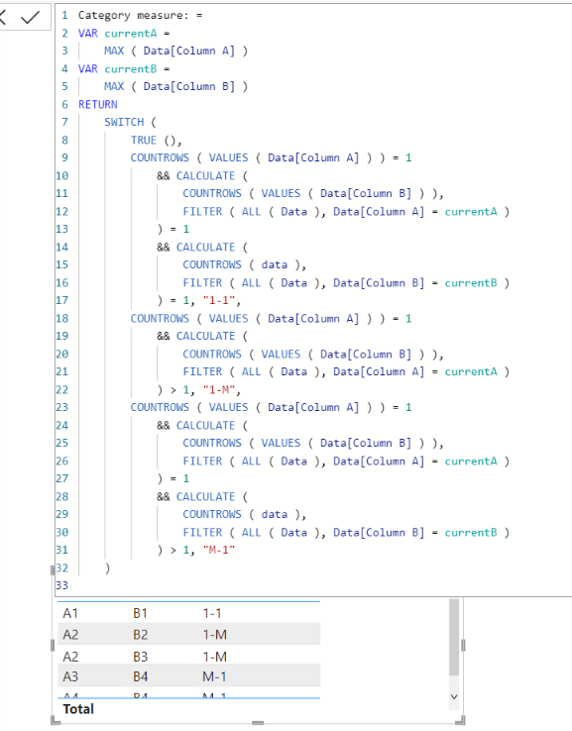
Category measure: =
VAR currentA =
MAX ( Data[Column A] )
VAR currentB =
MAX ( Data[Column B] )
RETURN
SWITCH (
TRUE (),
COUNTROWS ( VALUES ( Data[Column A] ) ) = 1
&& CALCULATE (
COUNTROWS ( VALUES ( Data[Column B] ) ),
FILTER ( ALL ( Data ), Data[Column A] = currentA )
) = 1
&& CALCULATE (
COUNTROWS ( data ),
FILTER ( ALL ( Data ), Data[Column B] = currentB )
) = 1, "1-1",
COUNTROWS ( VALUES ( Data[Column A] ) ) = 1
&& CALCULATE (
COUNTROWS ( VALUES ( Data[Column B] ) ),
FILTER ( ALL ( Data ), Data[Column A] = currentA )
) > 1, "1-M",
COUNTROWS ( VALUES ( Data[Column A] ) ) = 1
&& CALCULATE (
COUNTROWS ( VALUES ( Data[Column B] ) ),
FILTER ( ALL ( Data ), Data[Column A] = currentA )
) = 1
&& CALCULATE (
COUNTROWS ( data ),
FILTER ( ALL ( Data ), Data[Column B] = currentB )
) > 1, "M-1"
)
Hi,
If you want to check creating a measure, please check the below picture and the attached pbix file.
Category measure: =
VAR currentA =
MAX ( Data[Column A] )
VAR currentB =
MAX ( Data[Column B] )
RETURN
SWITCH (
TRUE (),
COUNTROWS ( VALUES ( Data[Column A] ) ) = 1
&& CALCULATE (
COUNTROWS ( VALUES ( Data[Column B] ) ),
FILTER ( ALL ( Data ), Data[Column A] = currentA )
) = 1
&& CALCULATE (
COUNTROWS ( data ),
FILTER ( ALL ( Data ), Data[Column B] = currentB )
) = 1, "1-1",
COUNTROWS ( VALUES ( Data[Column A] ) ) = 1
&& CALCULATE (
COUNTROWS ( VALUES ( Data[Column B] ) ),
FILTER ( ALL ( Data ), Data[Column A] = currentA )
) > 1, "1-M",
COUNTROWS ( VALUES ( Data[Column A] ) ) = 1
&& CALCULATE (
COUNTROWS ( VALUES ( Data[Column B] ) ),
FILTER ( ALL ( Data ), Data[Column A] = currentA )
) = 1
&& CALCULATE (
COUNTROWS ( data ),
FILTER ( ALL ( Data ), Data[Column B] = currentB )
) > 1, "M-1"
)
dear @Jihwan_Kim ,
Thanks a lot! It works perfectly fine.
I wish to add another rules where Column A = "NA", then the category = Blank().
I added this logic as 1st rule:
@kilala , Try to have new column like
New column =
var _1 = countx(filter(Table, [Column A] = earlier([Column A]) ), [Column B])
var _2 = countx(filter(Table, [Column B] = earlier([Column B]) ), [Column A])
return
Switch(True() ,
_1 =1 && _2 =1, "1-1" ,
_1 =1 && _2 >1, "1-M" ,
_1 >1 && _2 =1, "M-1" ,
"M-M"
)
Hi, tanks for the reply! Unfortunately, I cannot create new column as I connecting to live data. I am only able to create measures.
However, I tried your approach but an error shows here:
var _1 = countx(filter(Table, [Column A] = earlier([Column A]) ), [Column B])
error message:
Parameter is not correct type; cannot find name [Column A]
please help!
The Power BI Data Visualization World Championships is back! Get ahead of the game and start preparing now!
| User | Count |
|---|---|
| 39 | |
| 37 | |
| 33 | |
| 32 | |
| 29 |
| User | Count |
|---|---|
| 132 | |
| 88 | |
| 82 | |
| 68 | |
| 64 |