Get Fabric or SQL Certified for Free.
Get certified for free when you join Fabric Data Days 2026 and dive into Fabric, Power BI, SQL, AI, and other essential data skills.
Join now- Power BI forums
- Get Help with Power BI
- Desktop
- Service
- Report Server
- Power Query
- Mobile Apps
- Developer
- DAX Commands and Tips
- Custom Visuals Development Discussion
- Health and Life Sciences
- Power BI Spanish forums
- Translated Spanish Desktop
- Training and Consulting
- Instructor Led Training
- Dashboard in a Day for Women, by Women
- Galleries
- Data Stories Gallery
- Themes Gallery
- Contests Gallery
- QuickViz Gallery
- Quick Measures Gallery
- Visual Calculations Gallery
- Fabric Apps Gallery
- Notebook Gallery
- Translytical Task Flow Gallery
- TMDL Gallery
- R Script Showcase
- Webinars and Video Gallery
- Ideas
- Custom Visuals Ideas (read-only)
- Issues
- Issues
- Events
- Upcoming Events
July 28 - August 9 | Final Round of the Power BI Dataviz World Championships. This is your chance. Learn more
- Power BI forums
- Forums
- Get Help with Power BI
- Desktop
- Re: Case Sensitivity
- Subscribe to RSS Feed
- Mark Topic as New
- Mark Topic as Read
- Float this Topic for Current User
- Bookmark
- Subscribe
- Printer Friendly Page


- Mark as New
- Bookmark
- Subscribe
- Mute
- Subscribe to RSS Feed
- Permalink
- Report Inappropriate Content
Case Sensitivity
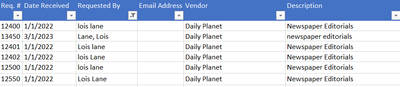
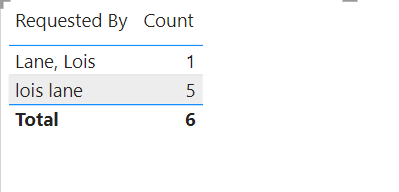
I need/want to maintain Case Sensitivity when creating reports.
It seems that PowerBi now changes the case on my excel data source as seen on this table visual
How can I fix this?
Solved! Go to Solution.


- Mark as New
- Bookmark
- Subscribe
- Mute
- Subscribe to RSS Feed
- Permalink
- Report Inappropriate Content
Power Query is case-sensitive, that's why you can add an index there to protect your sensistivity since Power BI is case-insensitive.
Proud to be a Super User! |  |

- Mark as New
- Bookmark
- Subscribe
- Mute
- Subscribe to RSS Feed
- Permalink
- Report Inappropriate Content
This is a huge problem for the architecture/engineering/construction community (BIM/VDC). We want to use the unique IDs of the IFC file format (IFC GUID) for 3D buildings and their data, but it's a case sensitive key.
Example: 2F$L$p5YXH0f$q71wYJpYv
As a result, what should be a simple logical connection becomes a data nightmare.
You can vote on this issue here to encourage Microsoft to allow us the flexibility to have this precision with our data: https://community.fabric.microsoft.com/t5/Fabric-Ideas/Case-sensitive-insensitive-option-in-Power-BI...
- Mark as New
- Bookmark
- Subscribe
- Mute
- Subscribe to RSS Feed
- Permalink
- Report Inappropriate Content
Thank You!
- Mark as New
- Bookmark
- Subscribe
- Mute
- Subscribe to RSS Feed
- Permalink
- Report Inappropriate Content
You're welcome!
Proud to be a Super User! | |

- Mark as New
- Bookmark
- Subscribe
- Mute
- Subscribe to RSS Feed
- Permalink
- Report Inappropriate Content
@PaulPalkowski Hey,
Kindly refer below webpage.
Power BI: How To Transform Data To Uppercase (quicklylearnpowerbi.com)
or
you can go power query
select column => transform => you can select "capitalize each word"
to get all word as same in your excel.
Thanks
Harish
Did I answer your question? Mark my post as a solution!
- Mark as New
- Bookmark
- Subscribe
- Mute
- Subscribe to RSS Feed
- Permalink
- Report Inappropriate Content
no, i want to keep the data as entered... What I shared was only an example. What I have is product assignment naming conventions such as 1524E-PP and 1524E-pp where the PP means it has been inspected and the pp means it has not. The are many variations such as e1487-c is aprototype but e1487-C is and approved part. The letter's case in the hundreds of part numbers represents various stages.
- Mark as New
- Bookmark
- Subscribe
- Mute
- Subscribe to RSS Feed
- Permalink
- Report Inappropriate Content
Hello! The main engine of Power BI is case-insensitive. However, you can create a workaround for this by creating an index for the different case values in Power Query because case-sensitivity is recognized there. Here is a blog that should help explain in more detail: Letter case-sensitivity in DAX, Power BI and Analysis Services - SQLBI
Proud to be a Super User! | |
- Mark as New
- Bookmark
- Subscribe
- Mute
- Subscribe to RSS Feed
- Permalink
- Report Inappropriate Content
I thought at one time, case sensitivity was not auto-corrected in PowerBi . Did this change or perhaps I am thinking of relationships between tables or some other element.
- Mark as New
- Bookmark
- Subscribe
- Mute
- Subscribe to RSS Feed
- Permalink
- Report Inappropriate Content
Power Query is case-sensitive, that's why you can add an index there to protect your sensistivity since Power BI is case-insensitive.
Proud to be a Super User! | |

Helpful resources

FabCon & SQLCon – Barcelona 2026
Join us in Barcelona for FabCon and SQLCon, the Fabric, Power BI, SQL, and AI community event. Save €200 with code FABCMTY200.

Fabric Community Sticker Challenge - Barcelona 2026
If you love stickers, then you will definitely want to check out our community sticker challenge, Barcelona edition!

Power BI Monthly Update - July 2026
Check out the July 2026 Power BI update to learn about new features.

Power BI DataViz World Championships - June 2026
A new Power BI DataViz World Championship is coming this June! Don't miss out on submitting your entry.

| User | Count |
|---|---|
| 25 | |
| 23 | |
| 22 | |
| 17 | |
| 14 |


| User | Count |
|---|---|
| 27 | |
| 24 | |
| 20 | |
| 20 | |
| 19 |


