Join us in Barcelona for FabCon and SQLCon, September 28 - October 1, 2026.
This is best Fabric, Power BI, SQL and AI community event. How do we know? The last event sold out! Save €200 with code FABCMTY200.
Register now- Power BI forums
- Get Help with Power BI
- Desktop
- Service
- Report Server
- Power Query
- Mobile Apps
- Developer
- DAX Commands and Tips
- Custom Visuals Development Discussion
- Health and Life Sciences
- Power BI Spanish forums
- Translated Spanish Desktop
- Training and Consulting
- Instructor Led Training
- Dashboard in a Day for Women, by Women
- Galleries
- Data Stories Gallery
- Themes Gallery
- Contests Gallery
- QuickViz Gallery
- Quick Measures Gallery
- Visual Calculations Gallery
- Fabric Apps Gallery
- Notebook Gallery
- Translytical Task Flow Gallery
- TMDL Gallery
- R Script Showcase
- Webinars and Video Gallery
- Ideas
- Custom Visuals Ideas (read-only)
- Issues
- Issues
- Events
- Upcoming Events
July 28 - August 9 | Final Round of the Power BI Dataviz World Championships. This is your chance. Learn more
- Power BI forums
- Forums
- Get Help with Power BI
- Desktop
- Re: Case Sensitivity
- Subscribe to RSS Feed
- Mark Topic as New
- Mark Topic as Read
- Float this Topic for Current User
- Bookmark
- Subscribe
- Printer Friendly Page


- Mark as New
- Bookmark
- Subscribe
- Mute
- Subscribe to RSS Feed
- Permalink
- Report Inappropriate Content
Case Sensitivity
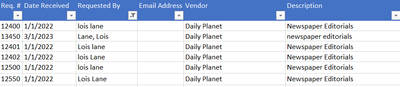
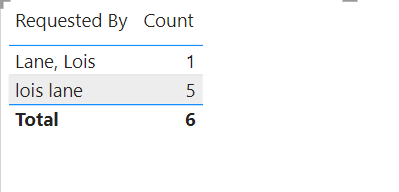
I need/want to maintain Case Sensitivity when creating reports.
It seems that PowerBi now changes the case on my excel data source as seen on this table visual
How can I fix this?
Solved! Go to Solution.


- Mark as New
- Bookmark
- Subscribe
- Mute
- Subscribe to RSS Feed
- Permalink
- Report Inappropriate Content
Power Query is case-sensitive, that's why you can add an index there to protect your sensistivity since Power BI is case-insensitive.
Proud to be a Super User! |  |

- Mark as New
- Bookmark
- Subscribe
- Mute
- Subscribe to RSS Feed
- Permalink
- Report Inappropriate Content
This is a huge problem for the architecture/engineering/construction community (BIM/VDC). We want to use the unique IDs of the IFC file format (IFC GUID) for 3D buildings and their data, but it's a case sensitive key.
Example: 2F$L$p5YXH0f$q71wYJpYv
As a result, what should be a simple logical connection becomes a data nightmare.
You can vote on this issue here to encourage Microsoft to allow us the flexibility to have this precision with our data: https://community.fabric.microsoft.com/t5/Fabric-Ideas/Case-sensitive-insensitive-option-in-Power-BI...
- Mark as New
- Bookmark
- Subscribe
- Mute
- Subscribe to RSS Feed
- Permalink
- Report Inappropriate Content
Thank You!
- Mark as New
- Bookmark
- Subscribe
- Mute
- Subscribe to RSS Feed
- Permalink
- Report Inappropriate Content
You're welcome!
Proud to be a Super User! | |

- Mark as New
- Bookmark
- Subscribe
- Mute
- Subscribe to RSS Feed
- Permalink
- Report Inappropriate Content
@PaulPalkowski Hey,
Kindly refer below webpage.
Power BI: How To Transform Data To Uppercase (quicklylearnpowerbi.com)
or
you can go power query
select column => transform => you can select "capitalize each word"
to get all word as same in your excel.
Thanks
Harish
Did I answer your question? Mark my post as a solution!
- Mark as New
- Bookmark
- Subscribe
- Mute
- Subscribe to RSS Feed
- Permalink
- Report Inappropriate Content
no, i want to keep the data as entered... What I shared was only an example. What I have is product assignment naming conventions such as 1524E-PP and 1524E-pp where the PP means it has been inspected and the pp means it has not. The are many variations such as e1487-c is aprototype but e1487-C is and approved part. The letter's case in the hundreds of part numbers represents various stages.
- Mark as New
- Bookmark
- Subscribe
- Mute
- Subscribe to RSS Feed
- Permalink
- Report Inappropriate Content
Hello! The main engine of Power BI is case-insensitive. However, you can create a workaround for this by creating an index for the different case values in Power Query because case-sensitivity is recognized there. Here is a blog that should help explain in more detail: Letter case-sensitivity in DAX, Power BI and Analysis Services - SQLBI
Proud to be a Super User! | |
- Mark as New
- Bookmark
- Subscribe
- Mute
- Subscribe to RSS Feed
- Permalink
- Report Inappropriate Content
I thought at one time, case sensitivity was not auto-corrected in PowerBi . Did this change or perhaps I am thinking of relationships between tables or some other element.
- Mark as New
- Bookmark
- Subscribe
- Mute
- Subscribe to RSS Feed
- Permalink
- Report Inappropriate Content
Power Query is case-sensitive, that's why you can add an index there to protect your sensistivity since Power BI is case-insensitive.
Proud to be a Super User! | |

Helpful resources

FabCon & SQLCon – Barcelona 2026
Join us in Barcelona for FabCon and SQLCon, the Fabric, Power BI, SQL, and AI community event. Save €200 with code FABCMTY200.

Power BI DataViz World Championships - June 2026
A new Power BI DataViz World Championship is coming this June! Don't miss out on submitting your entry.

| User | Count |
|---|---|
| 26 | |
| 22 | |
| 20 | |
| 18 | |
| 14 |


| User | Count |
|---|---|
| 22 | |
| 20 | |
| 20 | |
| 20 | |
| 20 |


