cancel
Showing results for 
Search instead for 
Did you mean: 

The Power BI Data Visualization World Championships is back! Get ahead of the game and start preparing now! Learn more

Reply
Anonymous
Not applicable

Card from 2 separate data

Can you guys help me with my problem?

I have 2 separate data/table with names.

The reason why we have to separate data is because they have a separate line of business.

However, these tables can have the same name input and can repeat.

What I want is a Card that would count all the names. However, the repeating names will only count as 1.

Here's a visualization of the data:


Name 1Name 2
NoahJulia
JeraldMonroe
AugustNoah
JeraldChristian
ChristianKurt


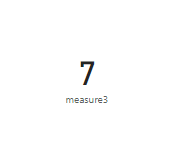
Given that, I want a card that would show as 7 since other names are repeating.

1 ACCEPTED SOLUTION
ryan_mayu
Super User
Super User

@Anonymous 


Please try below measure

measure3 = 
VAR namelist =
    VALUES ( 'Table'[Name1] )
var namelist2=VALUES('Table (2)'[Name2])
    var newtable= distinct(UNION(namelist,namelist2))
return COUNTROWS(newtable)

1.PNG

Hope this is helpful.


Did I answer your question? Mark my post as a solution!

Proud to be a Super User!


View solution in original post

3 REPLIES 3
ryan_mayu
Super User
Super User

@Anonymous 


I am not sure why you deleted your latest update. Maybe it was by mistake.


Exclude "Noah"

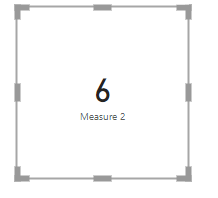
Measure 2 = 
VAR namelist =
    CALCULATETABLE(VALUES ( 'Table1'[Name 1] ),FILTER(Table1,Table1[Name 1]<>"Noah"))
var namelist2=
    CALCULATETABLE(VALUES('Table2'[Name 2]),FILTER(Table2,Table2[Name 2]<>"Noah"))
var newtable= 
    DISTINCT(UNION(namelist,namelist2))
return COUNTROWS(newtable)

1.PNG


Did I answer your question? Mark my post as a solution!

Proud to be a Super User!


amitchandak
Super User
Super User

@Anonymous , Try like

countx(distinct(union(Table[Name 1], Table[Name 2])),[Name 1])

Share with Power BI Enthusiasts: Full Power BI Video (20 Hours) YouTube
Microsoft Fabric Series 60+ Videos YouTube
Microsoft Fabric Hindi End to End YouTube
ryan_mayu
Super User
Super User

@Anonymous 


Please try below measure

measure3 = 
VAR namelist =
    VALUES ( 'Table'[Name1] )
var namelist2=VALUES('Table (2)'[Name2])
    var newtable= distinct(UNION(namelist,namelist2))
return COUNTROWS(newtable)

1.PNG

Hope this is helpful.


Did I answer your question? Mark my post as a solution!

Proud to be a Super User!


Helpful resources

Announcements
Power BI DataViz World Championships

Power BI Dataviz World Championships

The Power BI Data Visualization World Championships is back! Get ahead of the game and start preparing now!

December 2025 Power BI Update Carousel

Power BI Monthly Update - December 2025

Check out the December 2025 Power BI Holiday Recap!

FabCon Atlanta 2026 carousel

FabCon Atlanta 2026

Join us at FabCon Atlanta, March 16-20, for the ultimate Fabric, Power BI, AI and SQL community-led event. Save $200 with code FABCOMM.