Join us at FabCon Atlanta from March 16 - 20, 2026, for the ultimate Fabric, Power BI, AI and SQL community-led event. Save $200 with code FABCOMM.
Register now!Vote for your favorite vizzies from the Power BI Dataviz World Championship submissions. Vote now!
Can you guys help me with my problem?
I have 2 separate data/table with names.
The reason why we have to separate data is because they have a separate line of business.
However, these tables can have the same name input and can repeat.
What I want is a Card that would count all the names. However, the repeating names will only count as 1.
Here's a visualization of the data:
| Name 1 | Name 2 |
| Noah | Julia |
| Jerald | Monroe |
| August | Noah |
| Jerald | Christian |
| Christian | Kurt |
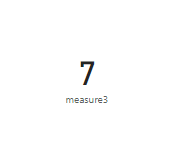
Given that, I want a card that would show as 7 since other names are repeating.
Solved! Go to Solution.
@Anonymous
Please try below measure
measure3 =
VAR namelist =
VALUES ( 'Table'[Name1] )
var namelist2=VALUES('Table (2)'[Name2])
var newtable= distinct(UNION(namelist,namelist2))
return COUNTROWS(newtable)Hope this is helpful.
Proud to be a Super User!
@Anonymous
I am not sure why you deleted your latest update. Maybe it was by mistake.
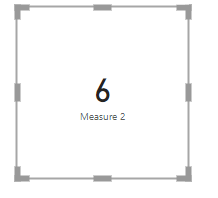
Exclude "Noah"
Measure 2 =
VAR namelist =
CALCULATETABLE(VALUES ( 'Table1'[Name 1] ),FILTER(Table1,Table1[Name 1]<>"Noah"))
var namelist2=
CALCULATETABLE(VALUES('Table2'[Name 2]),FILTER(Table2,Table2[Name 2]<>"Noah"))
var newtable=
DISTINCT(UNION(namelist,namelist2))
return COUNTROWS(newtable)
Proud to be a Super User!
@Anonymous
Please try below measure
measure3 =
VAR namelist =
VALUES ( 'Table'[Name1] )
var namelist2=VALUES('Table (2)'[Name2])
var newtable= distinct(UNION(namelist,namelist2))
return COUNTROWS(newtable)Hope this is helpful.
Proud to be a Super User!
Vote for your favorite vizzies from the Power BI World Championship submissions!
If you love stickers, then you will definitely want to check out our Community Sticker Challenge!
Check out the January 2026 Power BI update to learn about new features.
| User | Count |
|---|---|
| 57 | |
| 55 | |
| 42 | |
| 16 | |
| 16 |
| User | Count |
|---|---|
| 113 | |
| 106 | |
| 39 | |
| 35 | |
| 26 |