This time we’re going bigger than ever. Fabric, Power BI, SQL, AI and more. We're covering it all. You won't want to miss it.
Learn moreDid you hear? There's a new SQL AI Developer certification (DP-800). Start preparing now and be one of the first to get certified. Register now
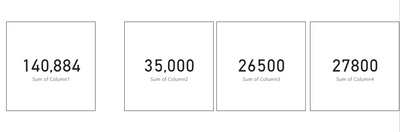
I've got a page with eight cards on it. I careted the first card and copied it out to create the other seven. For the callout value on the original card I have dispaly units set to "none" and value decimal places set to "0". The card displays 43,684 as expected; however, on five of the other cards the values will show as 15464, 25792, etc. They are missing the comma. Then on two of the other copied cards it shows the comma in the value.
Did I find a bug? Am I missing something from a formatting perspective? I'd like to have consistancy across all the cards and this driving me nuts.
Solved! Go to Solution.
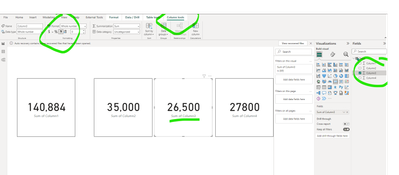
Following what you describe:
Click on where you get the values from:
In this case col 3 in the table, you will see column tools and add a comma.
The data display is important in the scenario that you are describing.
Let me know if you have any questions.
If this solves your issues, please mark it as the solution, so that others can find it easily. Kudos 👍are nice too.
Nathaniel
Proud to be a Super User!
Following what you describe:
Click on where you get the values from:
In this case col 3 in the table, you will see column tools and add a comma.
The data display is important in the scenario that you are describing.
Let me know if you have any questions.
If this solves your issues, please mark it as the solution, so that others can find it easily. Kudos 👍are nice too.
Nathaniel
Proud to be a Super User!
Well crap....don't I feel stupid. Thanks!
Hi @PowerBINoob24 ,
You are welcome!
It happens to all of us - PBI is a very powerful tool and there are so many items to track.
Nathaniel
Proud to be a Super User!
Check out the April 2026 Power BI update to learn about new features.
If you have recently started exploring Fabric, we'd love to hear how it's going. Your feedback can help with product improvements.
| User | Count |
|---|---|
| 36 | |
| 32 | |
| 31 | |
| 21 | |
| 15 |
| User | Count |
|---|---|
| 67 | |
| 56 | |
| 31 | |
| 27 | |
| 22 |