Get certified for free when you join Fabric Data Days 2026 and dive into Fabric, Power BI, SQL, AI, and other essential data skills.
Join nowJuly 7 - July 17 | Round 2 of the Power BI Dataviz World Championships. Don't miss your chance! Learn more
Hello All,
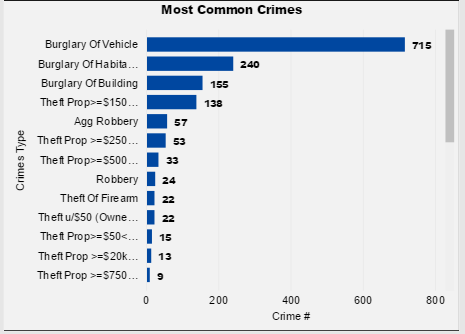
Need your help! Is there any way that I can capture the name of crime which has max counts? With below case it should show Burglary of vehicle since its count is 715. I have a measure which gets the value of max count = 715 but not sure how to write anothet measure which will show the value corresponding to this value.
Please advise, thanks!
Solved! Go to Solution.
Hi @Anonymous
Assuming your Table name is "CrimeData", try this measure
Most Common Crime =
VAR Maxvalue =
MAXX (
SUMMARIZE (
CrimeData,
CrimeData[CrimeType],
"Count", COUNT ( CrimeData[CrimeType] )
),
[Count]
)
RETURN
CALCULATE (
VALUES ( CrimeData[CrimeType] ),
FILTER (
VALUES ( CrimeData[CrimeType] ),
CALCULATE ( COUNT ( CrimeData[CrimeType] ) ) = MaxValue
)
)
Can you please tell me how did you create the measure that shows you the max count - 715 ?
Thanks
Hi, I used the following formula to get the max value.
Measure = MAXX ( VALUES ( table[column1] ), CALCULATE ( COUNT ( table[column2] ) ) )
Hope this helps, else please write again. Thanks
It works. Thank you.
Hi @Anonymous
Assuming your Table name is "CrimeData", try this measure
Most Common Crime =
VAR Maxvalue =
MAXX (
SUMMARIZE (
CrimeData,
CrimeData[CrimeType],
"Count", COUNT ( CrimeData[CrimeType] )
),
[Count]
)
RETURN
CALCULATE (
VALUES ( CrimeData[CrimeType] ),
FILTER (
VALUES ( CrimeData[CrimeType] ),
CALCULATE ( COUNT ( CrimeData[CrimeType] ) ) = MaxValue
)
)
When there are multiple values for Most Common Crime, it's not working.
Join us in Barcelona for FabCon and SQLCon, the Fabric, Power BI, SQL, and AI community event. Save €200 with code FABCMTY200.
Join Fabric Data Days 2026: 60 days of free live/on-demand sessions, challenges, study groups, and certification opportunities.
| User | Count |
|---|---|
| 22 | |
| 22 | |
| 18 | |
| 16 | |
| 13 |
| User | Count |
|---|---|
| 63 | |
| 42 | |
| 40 | |
| 40 | |
| 40 |