Join us at FabCon Atlanta from March 16 - 20, 2026, for the ultimate Fabric, Power BI, AI and SQL community-led event. Save $200 with code FABCOMM.
Register now!The Power BI Data Visualization World Championships is back! Get ahead of the game and start preparing now! Learn more
Hello All,
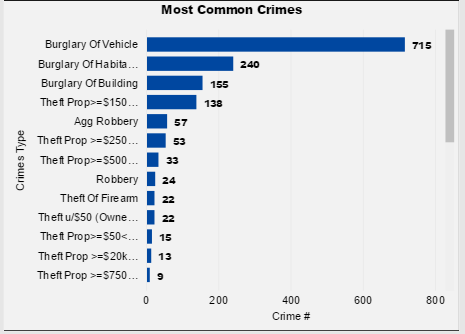
Need your help! Is there any way that I can capture the name of crime which has max counts? With below case it should show Burglary of vehicle since its count is 715. I have a measure which gets the value of max count = 715 but not sure how to write anothet measure which will show the value corresponding to this value.
Please advise, thanks!
Solved! Go to Solution.
Hi @Anonymous
Assuming your Table name is "CrimeData", try this measure
Most Common Crime =
VAR Maxvalue =
MAXX (
SUMMARIZE (
CrimeData,
CrimeData[CrimeType],
"Count", COUNT ( CrimeData[CrimeType] )
),
[Count]
)
RETURN
CALCULATE (
VALUES ( CrimeData[CrimeType] ),
FILTER (
VALUES ( CrimeData[CrimeType] ),
CALCULATE ( COUNT ( CrimeData[CrimeType] ) ) = MaxValue
)
)
Can you please tell me how did you create the measure that shows you the max count - 715 ?
Thanks
Hi, I used the following formula to get the max value.
Measure = MAXX ( VALUES ( table[column1] ), CALCULATE ( COUNT ( table[column2] ) ) )
Hope this helps, else please write again. Thanks
It works. Thank you.
Hi @Anonymous
Assuming your Table name is "CrimeData", try this measure
Most Common Crime =
VAR Maxvalue =
MAXX (
SUMMARIZE (
CrimeData,
CrimeData[CrimeType],
"Count", COUNT ( CrimeData[CrimeType] )
),
[Count]
)
RETURN
CALCULATE (
VALUES ( CrimeData[CrimeType] ),
FILTER (
VALUES ( CrimeData[CrimeType] ),
CALCULATE ( COUNT ( CrimeData[CrimeType] ) ) = MaxValue
)
)
When there are multiple values for Most Common Crime, it's not working.
The Power BI Data Visualization World Championships is back! Get ahead of the game and start preparing now!
| User | Count |
|---|---|
| 63 | |
| 55 | |
| 42 | |
| 41 | |
| 23 |
| User | Count |
|---|---|
| 171 | |
| 136 | |
| 119 | |
| 79 | |
| 54 |