cancel
Showing results for 
Search instead for 
Did you mean: 

The Power BI Data Visualization World Championships is back! Get ahead of the game and start preparing now! Learn more

Reply
Sonal2901
Frequent Visitor

Can't mark table as date table

Hi,

I have a date table using sql query from oracle database. It is in direct query mode.
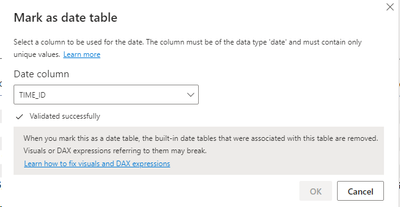
When I'm trying to mark it as a date table, and select Date Colum, it gets validated successfully but  the OK button is disabled.

I tried changing format from datetime to date but it didn't worked. 

Any help would be appreciated. Thanks

Sonal2901_0-1658833444946.png


2 REPLIES 2
amitchandak
Super User
Super User

@Sonal2901 , It should be a date column without any timestamp. And dates should not repeat. Make sure datatype is date or datetime

Share with Power BI Enthusiasts: Full Power BI Video (20 Hours) YouTube
Microsoft Fabric Series 60+ Videos YouTube
Microsoft Fabric Hindi End to End YouTube

It is a date column with timestamp. I tried creating copy of this column removing timestamp in the oracle query but that isn't happening. Used trunc too but it sets the timestamp to midnight rather than removing it.

I can't change its datatype in Power BI because it will make my table to switch to import mode and I need it to be in dual mode. 😞

Helpful resources

Announcements
Power BI DataViz World Championships

Power BI Dataviz World Championships

The Power BI Data Visualization World Championships is back! Get ahead of the game and start preparing now!

December 2025 Power BI Update Carousel

Power BI Monthly Update - December 2025

Check out the December 2025 Power BI Holiday Recap!

FabCon Atlanta 2026 carousel

FabCon Atlanta 2026

Join us at FabCon Atlanta, March 16-20, for the ultimate Fabric, Power BI, AI and SQL community-led event. Save $200 with code FABCOMM.