We've captured the moments from FabCon & SQLCon that everyone is talking about, and we are bringing them to the community, live and on-demand. Starts on April 14th. Register now
Hello Experts
Please how can i create the following fiscal Calendar Table that:
1. Starts from February 2019 - to date, (or From February 2019 - January 2021 fiscal year) and
2. Has Daily, Weekly, Monthly and Qualterly Calendar?
Solved! Go to Solution.
Hi @nosirui54 ,
According to your description, here’s my solution.
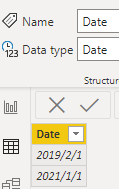
1.Create a date table, which has the max and min time of your calendar.
2.Create a new table like this.
Best Regards,
Community Support Team _ kalyj
If this post helps, then please consider Accept it as the solution to help the other members find it more quickly.
Hi @nosirui54 ,
According to your description, here’s my solution.
1.Create a date table, which has the max and min time of your calendar.
2.Create a new table like this.
Best Regards,
Community Support Team _ kalyj
If this post helps, then please consider Accept it as the solution to help the other members find it more quickly.
Awesome. Thank you SO much for the solution its works. Please Is there a way I can twist the Measures to (May 2019 - April 2030). Assuming, I don’t have existing reference Data to use the Min/Max with?
I mean how can I avoid the Min/Max, supposing I don’t have exiting data yet, like I just want to create a Fiscal Calendar Table (May 2019 - April 2030) or from (May 2019 – April 2021).
Here's a fairly comprehensive template you can take the pieces you need from:
https://www.sqlbi.com/articles/reference-date-table-in-dax-and-power-bi/
If you have recently started exploring Fabric, we'd love to hear how it's going. Your feedback can help with product improvements.
A new Power BI DataViz World Championship is coming this June! Don't miss out on submitting your entry.
| User | Count |
|---|---|
| 56 | |
| 40 | |
| 36 | |
| 18 | |
| 18 |
| User | Count |
|---|---|
| 70 | |
| 67 | |
| 38 | |
| 34 | |
| 23 |