Join us at FabCon Atlanta from March 16 - 20, 2026, for the ultimate Fabric, Power BI, AI and SQL community-led event. Save $200 with code FABCOMM.
Register now!The Power BI Data Visualization World Championships is back! It's time to submit your entry. Live now!
This may be a real simple calculation, but I am having trouble gettting it. Perhaps, because it's a Monday.
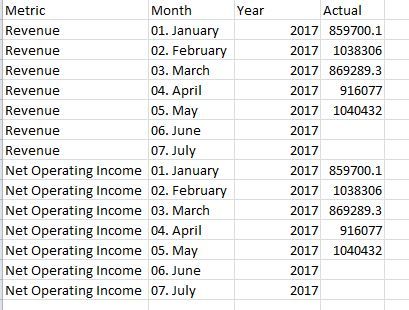
What I want to do is calculate the Net Operating Income as a % of Revenue for each month. I know I want to do Net Operating Income / Revenue, but how do I create the measure with the data set up this way?
Thanks!
Solved! Go to Solution.
You may create a measure as shown below.
Measure =
DIVIDE (
CALCULATE ( SUM ( Table1[Actual] ), Table1[Metric] = "Net Operating Income" ),
CALCULATE ( SUM ( Table1[Actual] ), Table1[Metric] = "Revenue" )
)
You may create a measure as shown below.
Measure =
DIVIDE (
CALCULATE ( SUM ( Table1[Actual] ), Table1[Metric] = "Net Operating Income" ),
CALCULATE ( SUM ( Table1[Actual] ), Table1[Metric] = "Revenue" )
)
Hey,
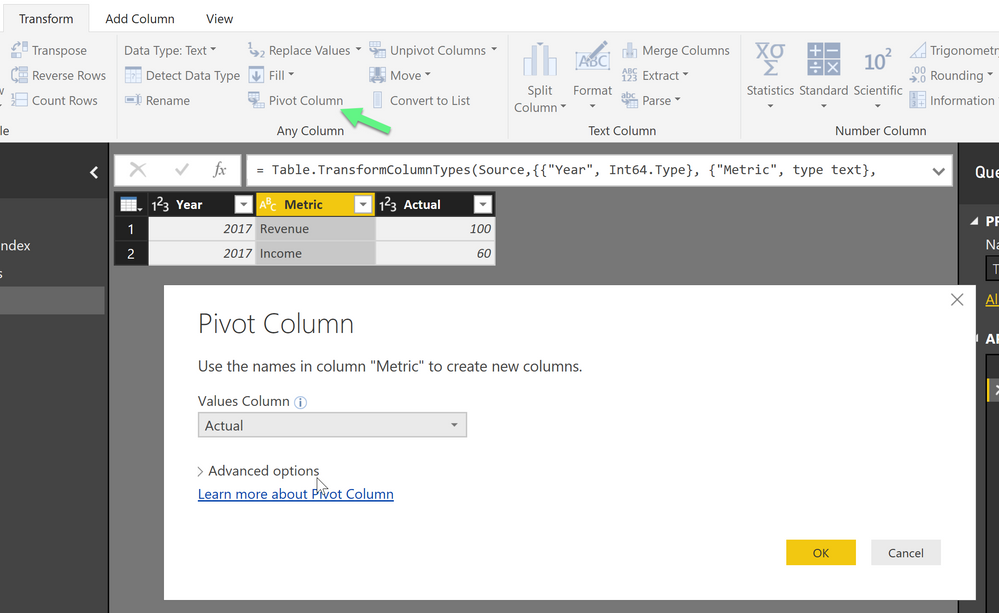
the easiest way to achieve what you want is to pivot your table in Power Query and create two metric colums with the value
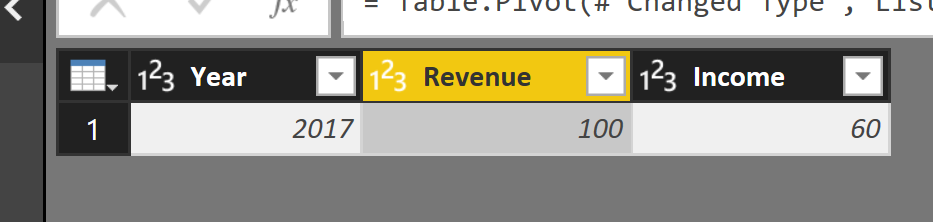
And than the result looks like this
From here you can simply your measure, without pivoting your Metric column can can become very difficult to find the proper lines.
Hope this helps
Do you need the NOI to be in the same column as your monthly income? Or, could it be in a second column?
The Power BI Data Visualization World Championships is back! It's time to submit your entry.
| User | Count |
|---|---|
| 49 | |
| 43 | |
| 36 | |
| 33 | |
| 30 |
| User | Count |
|---|---|
| 138 | |
| 120 | |
| 60 | |
| 59 | |
| 56 |