This is best Fabric, Power BI, SQL and AI community event. How do we know? The last event sold out! Save €200 with code FABCMTY200.
Register nowA new Data Days event is coming soon! This time we’re going bigger than ever. Fabric, Power BI, SQL, AI and more. Don't miss out.
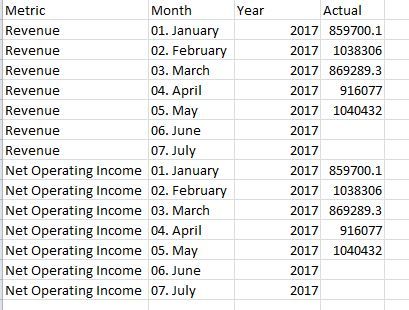
This may be a real simple calculation, but I am having trouble gettting it. Perhaps, because it's a Monday.
What I want to do is calculate the Net Operating Income as a % of Revenue for each month. I know I want to do Net Operating Income / Revenue, but how do I create the measure with the data set up this way?
Thanks!
Solved! Go to Solution.
You may create a measure as shown below.
Measure =
DIVIDE (
CALCULATE ( SUM ( Table1[Actual] ), Table1[Metric] = "Net Operating Income" ),
CALCULATE ( SUM ( Table1[Actual] ), Table1[Metric] = "Revenue" )
)
You may create a measure as shown below.
Measure =
DIVIDE (
CALCULATE ( SUM ( Table1[Actual] ), Table1[Metric] = "Net Operating Income" ),
CALCULATE ( SUM ( Table1[Actual] ), Table1[Metric] = "Revenue" )
)
Hey,
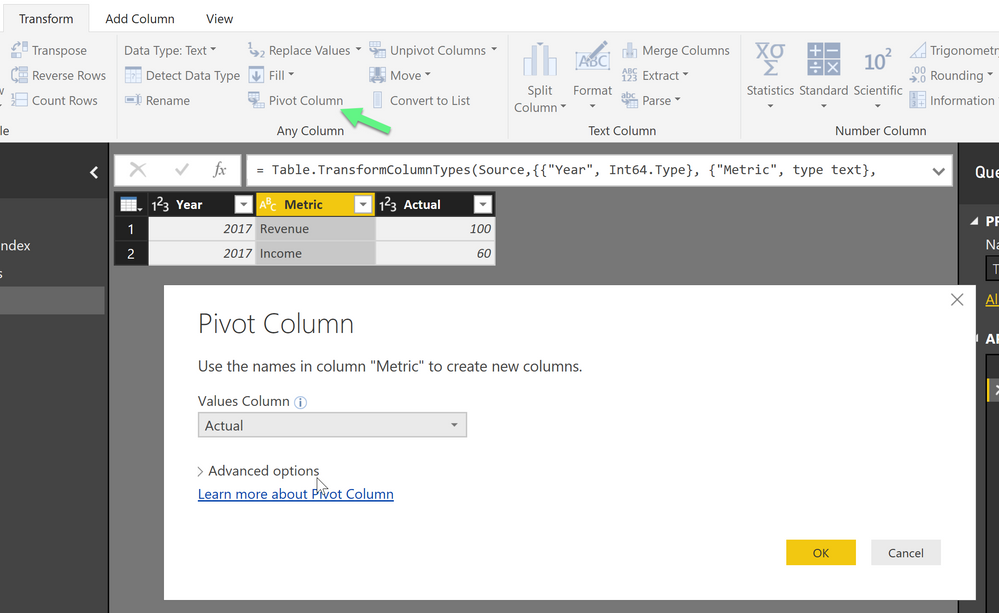
the easiest way to achieve what you want is to pivot your table in Power Query and create two metric colums with the value
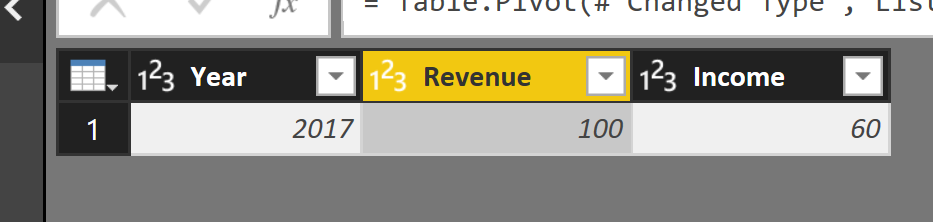
And than the result looks like this
From here you can simply your measure, without pivoting your Metric column can can become very difficult to find the proper lines.
Hope this helps
Do you need the NOI to be in the same column as your monthly income? Or, could it be in a second column?
Check out the May 2026 Power BI update to learn about new features.
Sign up to receive a private message when registration opens and key events begin.
If you have recently started exploring Fabric, we'd love to hear how it's going. Your feedback can help with product improvements.
| User | Count |
|---|---|
| 31 | |
| 26 | |
| 23 | |
| 22 | |
| 15 |
| User | Count |
|---|---|
| 63 | |
| 45 | |
| 28 | |
| 24 | |
| 22 |