Get certified for free when you join Fabric Data Days 2026 and dive into Fabric, Power BI, SQL, AI, and other essential data skills.
Join nowData Days is here! Join us now for 60+ days of learning, challenges, and connection. Learn more
Guys, good morning! I have a sales table with two years being 2020 and 2021, I need to do the following calculations 2021 product sales amount * 2021 product sales amount 2020 product sales amount * 2021 product sales amount The sales amount will always be 2021 The problem is that I can only consider products that have passed in two years, products that have passed in just one year cannot be included in the calculation. Does anyone have any ideas please? I spent the day racking my brain, I currently have this calculation in excel. Thanks
@Vitor_sp_bo Sorry, having trouble following, can you post sample data as text and expected output?
Not really enough information to go on, please first check if your issue is a common issue listed here: https://community.powerbi.com/t5/Community-Blog/Before-You-Post-Read-This/ba-p/1116882
Also, please see this post regarding How to Get Your Question Answered Quickly: https://community.powerbi.com/t5/Community-Blog/How-to-Get-Your-Question-Answered-Quickly/ba-p/38490
The most important parts are:
1. Sample data as text, use the table tool in the editing bar
2. Expected output from sample data
3. Explanation in words of how to get from 1. to 2.
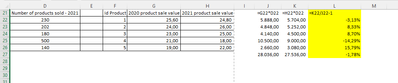
Okay, I'll try to make a logical explanation and I'm attaching an example of how I did it in excel
1° Step
2020 product sale value * Number of products sold - 2021
2° Step
2021 product sale value * Number of products sold - 2021
3° Add the total of products after the multiplication ( Separated by year, each year has its sum)
4°
Divide the sum of 2021 by the sum of 2020 - 1
I can only consider products that are in both years,
The value I need is the one in yellow:
Try DIVEDE function:
Measure = DIVIDE(SUM('Table'[2021 sales]),SUM('Table'[2020 sales]))-1
If you provide aggregated data, it is difficult to know your data model. Please provide the original data model in pbix with virtual data.
Don't miss out on Data Days, June 15 through August 7. Learn Fabric, Power BI, SQL, AI and more.
Check out the May 2026 Power BI update to learn about new features.
| User | Count |
|---|---|
| 23 | |
| 23 | |
| 21 | |
| 17 | |
| 13 |
| User | Count |
|---|---|
| 58 | |
| 51 | |
| 39 | |
| 29 | |
| 24 |