This time we’re going bigger than ever. Fabric, Power BI, SQL, AI and more. We're covering it all. You won't want to miss it.
Learn moreDid you hear? There's a new SQL AI Developer certification (DP-800). Start preparing now and be one of the first to get certified. Register now
Hello to everyone,
I would like to obtain some calculation on PowerBI
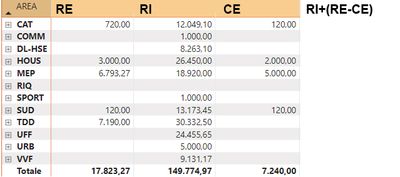
I created a matrix with 3 data columns (RE, RI, CE) and I would like to have a new column with a calculation (RI+(RE-CE))
How can I do?
Thank you in advance
Solved! Go to Solution.
Hi @olofu,
Did these values analyze from attribute, value columns(attribute to matrix column field, value to matrix value field), or three value columns?
If you mean the first one, you need to calculate based on the Aree group and filter conditions:
Result =
CALCULATE (
CALCULATE ( SUM ( Table[Value] ), [Type] = "RI" )
+ CALCULATE ( SUM ( Table[Value] ), [Type] = "RE" )
- CALCULATE ( SUM ( Table[Value] ), [Type] = "CE" ),
FILTER ( Table, [Area] = EARLIER ( Table[Area] ) )
)
If you mean the second one, you can directly create a calculated column to invoke these value fields to calculate:
Result =
Table[RI] + Table[RE] - Table[CE]
Regards,
Xiaoxin Sheng
Hi @olofu,
Did these values analyze from attribute, value columns(attribute to matrix column field, value to matrix value field), or three value columns?
If you mean the first one, you need to calculate based on the Aree group and filter conditions:
Result =
CALCULATE (
CALCULATE ( SUM ( Table[Value] ), [Type] = "RI" )
+ CALCULATE ( SUM ( Table[Value] ), [Type] = "RE" )
- CALCULATE ( SUM ( Table[Value] ), [Type] = "CE" ),
FILTER ( Table, [Area] = EARLIER ( Table[Area] ) )
)
If you mean the second one, you can directly create a calculated column to invoke these value fields to calculate:
Result =
Table[RI] + Table[RE] - Table[CE]
Regards,
Xiaoxin Sheng
@olofu
I would suggest you to do it using Calculation Groups in Tabular Editor:
Please refer to this article on how to do it: https://blog.enterprisedna.co/matrix-in-power-bi-using-calculation-groups/
⭕ Subscribe and learn Power BI from these videos
⚪ Website ⚪ LinkedIn ⚪ PBI User Group
Check out the April 2026 Power BI update to learn about new features.
Sign up to receive a private message when registration opens and key events begin.
If you have recently started exploring Fabric, we'd love to hear how it's going. Your feedback can help with product improvements.
| User | Count |
|---|---|
| 34 | |
| 31 | |
| 30 | |
| 21 | |
| 16 |
| User | Count |
|---|---|
| 63 | |
| 53 | |
| 31 | |
| 23 | |
| 23 |