cancel
Showing results for 
Search instead for 
Did you mean: 

Learn from the best! Meet the four finalists headed to the FINALS of the Power BI Dataviz World Championships! Register now

Reply
olofu
Frequent Visitor

Calculation on Matrix table

Hello to everyone,

I would like to obtain some calculation on PowerBI

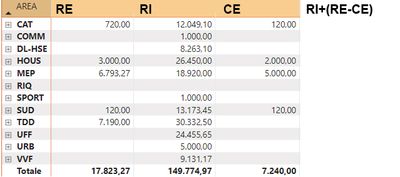
Cattura.jpg

I created a matrix with 3 data columns (RE, RI, CE)  and I would like to have a new column with a calculation (RI+(RE-CE))

How can I do?

Thank you in advance

1 ACCEPTED SOLUTION
Anonymous
Not applicable

Hi @olofu,

Did these values analyze from attribute, value columns(attribute to matrix column field, value to matrix value field), or three value columns?

If you mean the first one, you need to calculate based on the Aree group and filter conditions:

Result =
CALCULATE (
    CALCULATE ( SUM ( Table[Value] ), [Type] = "RI" )
        + CALCULATE ( SUM ( Table[Value] ), [Type] = "RE" )
        - CALCULATE ( SUM ( Table[Value] ), [Type] = "CE" ),
    FILTER ( Table, [Area] = EARLIER ( Table[Area] ) )
)

If you mean the second one, you can directly create a calculated column to invoke these value fields to calculate:

Result =
Table[RI] + Table[RE] - Table[CE]

Regards,

Xiaoxin Sheng

View solution in original post

3 REPLIES 3
Anonymous
Not applicable

Hi @olofu,

Did these values analyze from attribute, value columns(attribute to matrix column field, value to matrix value field), or three value columns?

If you mean the first one, you need to calculate based on the Aree group and filter conditions:

Result =
CALCULATE (
    CALCULATE ( SUM ( Table[Value] ), [Type] = "RI" )
        + CALCULATE ( SUM ( Table[Value] ), [Type] = "RE" )
        - CALCULATE ( SUM ( Table[Value] ), [Type] = "CE" ),
    FILTER ( Table, [Area] = EARLIER ( Table[Area] ) )
)

If you mean the second one, you can directly create a calculated column to invoke these value fields to calculate:

Result =
Table[RI] + Table[RE] - Table[CE]

Regards,

Xiaoxin Sheng

olofu
Frequent Visitor

I'm sorry @Fowmy but I cannot find the way for how to solve my question

Fowmy
Super User
Super User

@olofu 

I would suggest you to do it using Calculation Groups in Tabular Editor:
Please refer to this article on how to do it: https://blog.enterprisedna.co/matrix-in-power-bi-using-calculation-groups/


Did I answer your question? Mark my post as a solution! and hit thumbs up


Subscribe and learn Power BI from these videos

Website LinkedIn PBI User Group

Helpful resources

Announcements
Join our Fabric User Panel

Join our Fabric User Panel

Share feedback directly with Fabric product managers, participate in targeted research studies and influence the Fabric roadmap.

March Power BI Update Carousel

Power BI Community Update - March 2026

Check out the March 2026 Power BI update to learn about new features.