
Don't miss your chance to take the Fabric Data Engineer (DP-600) exam for FREE! Find out how by watching the DP-600 session on-demand now through April 28th.
Learn moreJoin the FabCon + SQLCon recap series. Up next: Power BI, Real-Time Intelligence, IQ and AI, and Data Factory take center stage. All sessions are available on-demand after the live show. Register now
Hi All,
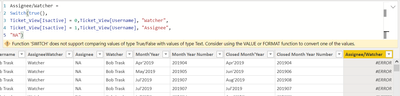
I'm trying to create a calulated column like below and its not working for me.
Please advice what should be done in place of this.
Regards,
Himanshu
Solved! Go to Solution.
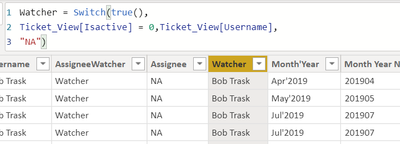
Finally came up with the below calculation which is somewhat as expected.
Hi,
You can try :
=TRUE() and =FALSE() instead of 1 and 0
Or as the yellow banner says use VALUE(YourColumn) instead of YourColumn directly.
and maybe remove UserName ?
or are you trying to concanate the results ?
In this case it shoud be :
UserName & "Watcher" or UserName & "Assignee" as a result in your formula.
Can you tell us more ?
Have already tried true/False its not working .
I'm trying to create a column where when the below condition meet it gives me "Assignee" and "Watcher"
Condition1 : isactive = 1 and then it should give me the username ( Which will be Assignee name)
Condition 2 : isactive = 0 and then also it should give username( which will be watcher)
OK so you should remove from your formula the "Watcher" and "Assignee".
It should be :
SWITCH (TRUE(),
IsActive = 1, "Assignee" & UserName,
IsActive = 0, "Watcher" & UserName,
"Not Existing")
Or it could be done in 2 different columns depends on your needs ?
Tell us if it works ?
I've already created individual columns
But the issue if when filtering the data , we've a value "NA" so it can be confusing for a user.
Finally came up with the below calculation which is somewhat as expected.
Check out the April 2026 Power BI update to learn about new features.
If you have recently started exploring Fabric, we'd love to hear how it's going. Your feedback can help with product improvements.
A new Power BI DataViz World Championship is coming this June! Don't miss out on submitting your entry.
| User | Count |
|---|---|
| 43 | |
| 35 | |
| 35 | |
| 21 | |
| 15 |
| User | Count |
|---|---|
| 64 | |
| 59 | |
| 29 | |
| 27 | |
| 25 |