
cancel
Showing results for 
Search instead for 
Did you mean: 

The Power BI Data Visualization World Championships is back! It's time to submit your entry. Live now!

Reply
Anonymous
Not applicable

Calculation not working

Hi All,


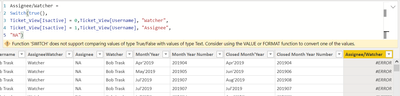
I'm trying to create a calulated column like below and its not working for me.

Please advice what should be done in place of this.


Himanshu_13_0-1649858589433.png


Regards,

Himanshu

1 ACCEPTED SOLUTION
Anonymous
Not applicable

Finally came up with the below calculation which is somewhat as expected.


Assignee/Watcher =
SWITCH(TRUE(),
Ticket_View[Isactive] = 1, "Assignee" & " - " & Ticket_View[Username],
Ticket_View[Isactive] = 0, "Watcher" & " - " & Ticket_View[Username],
"NA")

View solution in original post

5 REPLIES 5
AilleryO
Memorable Member
Memorable Member

Hi,


You can try :

=TRUE()   and   =FALSE()    instead of 1 and 0

Or as the yellow banner says use VALUE(YourColumn) instead of YourColumn directly.


and maybe remove UserName ?

or are you trying to concanate the results ?

In this case it shoud be :

UserName & "Watcher"    or  UserName & "Assignee"    as a result in your formula.


Can you tell us more ?

Anonymous
Not applicable

Have already tried true/False its not working .


I'm trying to create a column where when the below condition meet it gives me "Assignee" and "Watcher"


Condition1 : isactive = 1 and then it should give me the username ( Which will be Assignee name)

Condition 2 : isactive = 0 and then also it should give username( which will be watcher)


OK so you should remove from your formula the "Watcher" and "Assignee".

It should be :

SWITCH (TRUE(),
IsActive = 1, "Assignee" & UserName,
IsActive = 0, "Watcher" & UserName,
"Not Existing")

Or it could be done in 2 different columns depends on your needs ?
Tell us if it works ?

Anonymous
Not applicable

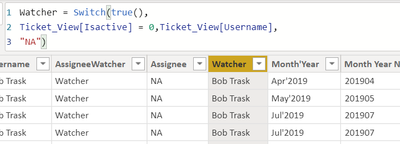
I've already created individual columns


Himanshu_13_0-1649863009116.pngHimanshu_13_1-1649863020330.png

But the issue if when filtering the data , we've a value "NA" so it can be confusing for a user.


Himanshu_13_2-1649863077249.png


Anonymous
Not applicable

Finally came up with the below calculation which is somewhat as expected.


Assignee/Watcher =
SWITCH(TRUE(),
Ticket_View[Isactive] = 1, "Assignee" & " - " & Ticket_View[Username],
Ticket_View[Isactive] = 0, "Watcher" & " - " & Ticket_View[Username],
"NA")

Helpful resources

Announcements
FabCon Atlanta 2026 carousel

FabCon Atlanta 2026

Join us at FabCon Atlanta, March 16-20, for the ultimate Fabric, Power BI, AI and SQL community-led event. Save $200 with code FABCOMM.