cancel
Showing results for 
Search instead for 
Did you mean: 

Learn from the best! Meet the four finalists headed to the FINALS of the Power BI Dataviz World Championships! Register now

Reply
Dunner2020
Post Prodigy
Post Prodigy

Calculating predicted value

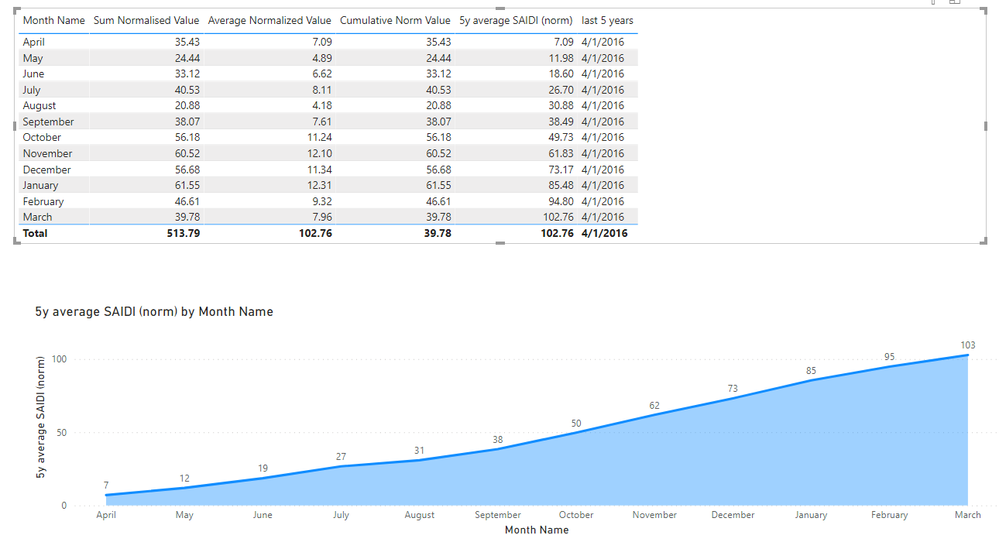
I am trying to show the predicted value of upcoming months based on the average of last 5 values. The regulatory year starts in April and Finishes in March.

The way I am calculating forecast value is the sum of the total value of months of current regulatory years and the last 5-year average value of remaining months.

For clarification, it would be like as follow

The predicted value of upcoming months = total value of current regulatory year + last 5 years average value of remaining months of the regulatory year.

For example, In April current regulatory year starts, so the predicted value of remaining months = actual value of April + last 5 years average value of remaining months (i.e. May to March).

I also don’t want to show the predicted value of months that are gone. For example, I don’t want to show the predicted value of April as it is gone.

To represent the above concept, I wrote the following measure:


Forecast Value =
Var _CYMonth = MONTH(TODAY())
Var _RYMonth = if(_CYMonth > 3 && _CYMonth <= 12, _CYMonth - 3,_CYMonth + 9)
Var sum_last_months = CALCULATE([Normalized Value],FILTER('Date','Date'[Date]<=EOMONTH(EOMONTH(TODAY(),0),-1)&&'Date'[Date] >= [Current_RY_Yr_Strt]))

Var average_remain_month_value = CALCULATE([Average Normalized Value -5y],FILTER(ALLSELECTED('Date'),MAX('Date'[RY Month Number])>=_RYMonth&&AND('Date'[RY Month Number]<=MAX('Date'[RY Month Number]),'Date'[RY Month Number]>=_RYMonth)))

Var total_estimate = average_remain_month_value + sum_last_months
Return

IF(not(ISBLANK(MAX('Date'[RY Month Number]))) && MAX('Date'[RY Month Number])>=_RYMonth,total_estimate,BLANK())
 
When I tried to plot the above measure in the line chart, it does not add the last month value as shown in the following picture:
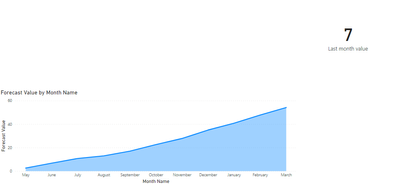
leo_89_0-1619861166448.png


The value of the last month of the current month is 7. So the predicted value of May should be 7 + 2.68 (based on last 5 year).
However, in the figure, it only shows 2.68, not 7+2.68.
Could anyone guide me where I am making the mistake?  Sample file here

1 ACCEPTED SOLUTION
v-kelly-msft
Community Support
Community Support

Hi @Dunner2020 ,


It's not very clear about your requirement based on the sample .pbix you provided:

v-kelly-msft_0-1620117778773.png

So which result is not the one you wanna get?Can you explain more detailed according to your sample data?


Best Regards,
Kelly

Did I answer your question? Mark my post as a solution!

View solution in original post

4 REPLIES 4
v-kelly-msft
Community Support
Community Support

Hi @Dunner2020 ,


It's not very clear about your requirement based on the sample .pbix you provided:

v-kelly-msft_0-1620117778773.png

So which result is not the one you wanna get?Can you explain more detailed according to your sample data?


Best Regards,
Kelly

Did I answer your question? Mark my post as a solution!

daxer-almighty
Solution Sage
Solution Sage

Hi @Dunner2020 


I don't think this is a very complex task... but the description is a bit lacking in my opinion. This makes it harder than it should be to find the right solution. Could you please rephrase your narrative and make it clearer?

I have tried to rephrase. please have a look.

Hi @Dunner2020 ,


Is your issue solved now?If so,could you pls mark the reply as answered to close it?


Best Regards,
Kelly

Did I answer your question? Mark my post as a solution!

Helpful resources

Announcements
Join our Fabric User Panel

Join our Fabric User Panel

Share feedback directly with Fabric product managers, participate in targeted research studies and influence the Fabric roadmap.

February Power BI Update Carousel

Power BI Monthly Update - February 2026

Check out the February 2026 Power BI update to learn about new features.

FabCon Atlanta 2026 carousel

FabCon Atlanta 2026

Join us at FabCon Atlanta, March 16-20, for the ultimate Fabric, Power BI, AI and SQL community-led event. Save $200 with code FABCOMM.