Join us in Barcelona for FabCon and SQLCon, September 28 - October 1, 2026.
This is best Fabric, Power BI, SQL and AI community event. How do we know? The last event sold out! Save €200 with code FABCMTY200.
Register now- Power BI forums
- Get Help with Power BI
- Desktop
- Service
- Report Server
- Power Query
- Mobile Apps
- Developer
- DAX Commands and Tips
- Custom Visuals Development Discussion
- Health and Life Sciences
- Power BI Spanish forums
- Translated Spanish Desktop
- Training and Consulting
- Instructor Led Training
- Dashboard in a Day for Women, by Women
- Galleries
- Data Stories Gallery
- Themes Gallery
- Contests Gallery
- QuickViz Gallery
- Quick Measures Gallery
- Visual Calculations Gallery
- Fabric Apps Gallery
- Notebook Gallery
- Translytical Task Flow Gallery
- TMDL Gallery
- R Script Showcase
- Webinars and Video Gallery
- Ideas
- Custom Visuals Ideas (read-only)
- Issues
- Issues
- Events
- Upcoming Events
The Fabric community is upgrading! Read all of the details including the timeline and what you can expect. Learn more
- Power BI forums
- Forums
- Get Help with Power BI
- Desktop
- Re: Calculating difference between dates comparing...
- Subscribe to RSS Feed
- Mark Topic as New
- Mark Topic as Read
- Float this Topic for Current User
- Bookmark
- Subscribe
- Printer Friendly Page


- Mark as New
- Bookmark
- Subscribe
- Mute
- Subscribe to RSS Feed
- Permalink
- Report Inappropriate Content
Calculating difference between dates comparing previous row
Hi
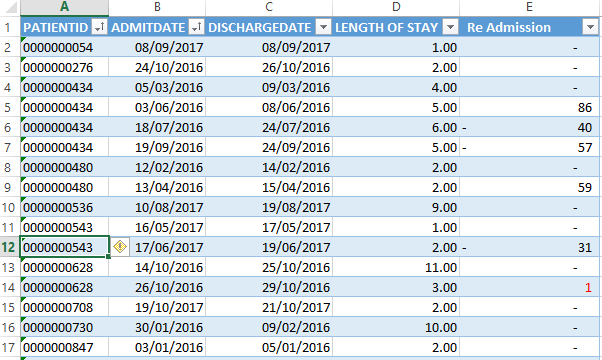
I have a table containing patients admission and discharge details. The objective is to find out patients re-admitted after discharge. If re-admitted in less than 5 days it should be alerted. I have calculated in excel manually, how to write DAX to achieve this result ? Just a comparison with previous row will not help, It should check the same paitent re-admission. In below example there is 1 patient re-admitted after 1 day.
Please help to find out a solution.
The sample data prepared in excel is given in the attached image.
Solved! Go to Solution.


- Mark as New
- Bookmark
- Subscribe
- Mute
- Subscribe to RSS Feed
- Permalink
- Report Inappropriate Content
Re Admission =
VAR PreviousDischargeDate =
    CALCULATE (
        MAX ( TableName[DISCHARGEDATE] ),
        FILTER (
            ALLEXCEPT ( TableName, TableName[PatientID] ),
            TableName[Index]
                = EARLIER ( TableName[Index] ) - 1
        )
    )
RETURN
    IF (
        NOT ( ISBLANK ( PreviousDischargeDate ) ),
        IF (
            PreviousDischargeDate < TableName[AdmitDate],
            DATEDIFF ( PreviousDischargeDate, TableName[AdmitDate], DAY )
        )
    )
Try this revised formula
Regards
Zubair
Please try my custom visuals
- Mark as New
- Bookmark
- Subscribe
- Mute
- Subscribe to RSS Feed
- Permalink
- Report Inappropriate Content
Hi,
Super solution, thanks a lot, it works perfect.
Warmest regards Jay, Once again Thanks.
- Mark as New
- Bookmark
- Subscribe
- Mute
- Subscribe to RSS Feed
- Permalink
- Report Inappropriate Content
Hi @Jayadev
Try this solution
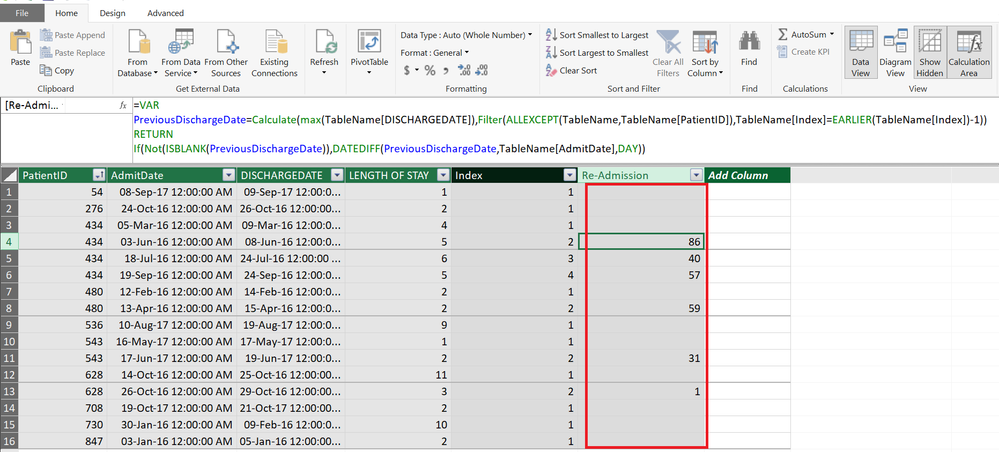
First add an Index Column for each PATIENTID. This will help in further calculations
Index =
RANKX (
    FILTER ( TableName, [PatientID] = EARLIER ( [PatientID] ) ),
    [AdmitDate],
    ,
    ASC,
    DENSE
)
Code beutified with Dax Formatter by SQLBI
Now you can get the Re-admission calculated column using this formula
Re Admission =
VAR PreviousDischargeDate =
    CALCULATE (
        MAX ( TableName[DISCHARGEDATE] ),
        FILTER (
            ALLEXCEPT ( TableName, TableName[PatientID] ),
            TableName[Index]
                = EARLIER ( TableName[Index] ) - 1
        )
    )
RETURN
    IF (
        NOT ( ISBLANK ( PreviousDischargeDate ) ),
        DATEDIFF ( PreviousDischargeDate, TableName[AdmitDate], DAY )
    )
Regards
Zubair
Please try my custom visuals
- Mark as New
- Bookmark
- Subscribe
- Mute
- Subscribe to RSS Feed
- Permalink
- Report Inappropriate Content
Thanks a lot for your valuable inputs. I am getting the following error. Please help.
In DATEDIFF function, the start date cannot be greater than the end date
Regards,
Jay
- Mark as New
- Bookmark
- Subscribe
- Mute
- Subscribe to RSS Feed
- Permalink
- Report Inappropriate Content
Re Admission =
VAR PreviousDischargeDate =
    CALCULATE (
        MAX ( TableName[DISCHARGEDATE] ),
        FILTER (
            ALLEXCEPT ( TableName, TableName[PatientID] ),
            TableName[Index]
                = EARLIER ( TableName[Index] ) - 1
        )
    )
RETURN
    IF (
        NOT ( ISBLANK ( PreviousDischargeDate ) ),
        IF (
            PreviousDischargeDate < TableName[AdmitDate],
            DATEDIFF ( PreviousDischargeDate, TableName[AdmitDate], DAY )
        )
    )
Try this revised formula
Regards
Zubair
Please try my custom visuals
- Mark as New
- Bookmark
- Subscribe
- Mute
- Subscribe to RSS Feed
- Permalink
- Report Inappropriate Content
Hi,
Super solution, thanks a lot, it works perfect.
Warmest regards Jay, Once again Thanks.
- Mark as New
- Bookmark
- Subscribe
- Mute
- Subscribe to RSS Feed
- Permalink
- Report Inappropriate Content
Regards
Zubair
Please try my custom visuals

Helpful resources

FabCon & SQLCon – Barcelona 2026
Join us in Barcelona for FabCon and SQLCon, the Fabric, Power BI, SQL, and AI community event. Save €200 with code FABCMTY200.

Power BI DataViz World Championships - June 2026
A new Power BI DataViz World Championship is coming this June! Don't miss out on submitting your entry.

| User | Count |
|---|---|
| 24 | |
| 22 | |
| 20 | |
| 18 | |
| 14 |


| User | Count |
|---|---|
| 45 | |
| 38 | |
| 24 | |
| 21 | |
| 20 |


