cancel
Showing results for 
Search instead for 
Did you mean: 

July 28 - August 9 | Final Round of the Power BI Dataviz World Championships. This is your chance. Learn more

Reply
Jayadev
Helper I
Helper I

Calculating difference between dates comparing previous row

Hi


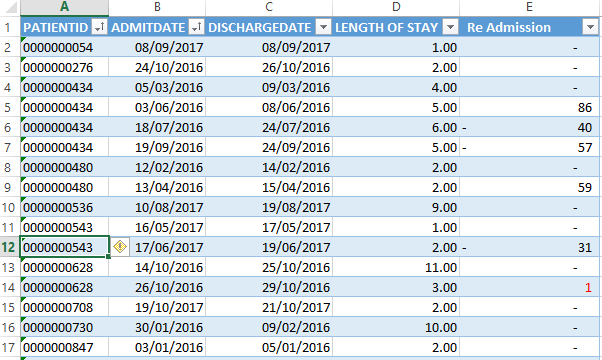
I have a table containing patients admission and discharge details. The objective is to find out patients re-admitted after discharge.  If re-admitted in less than 5 days it should be alerted.   I have calculated in excel manually, how to write DAX to achieve this result ?  Just a comparison with previous row will not help,  It should check the same paitent re-admission. In below example there is 1 patient re-admitted after 1 day.


Please help to find out a solution.


The sample data prepared in excel is given in the attached image.


readmission.PNG


2 ACCEPTED SOLUTIONS

@Jayadev

Re Admission =
VAR PreviousDischargeDate =
    CALCULATE (
        MAX ( TableName[DISCHARGEDATE] ),
        FILTER (
            ALLEXCEPT ( TableName, TableName[PatientID] ),
            TableName[Index]
                = EARLIER ( TableName[Index] ) - 1
        )
    )
RETURN
    IF (
        NOT ( ISBLANK ( PreviousDischargeDate ) ),
        IF (
            PreviousDischargeDate < TableName[AdmitDate],
            DATEDIFF ( PreviousDischargeDate, TableName[AdmitDate], DAY )
        )
    )


Try this revised formula


View solution in original post

Hi,


Super solution, thanks a lot,  it works perfect. 


Warmest regards Jay, Once again Thanks.

View solution in original post

5 REPLIES 5
Zubair_Muhammad
Community Champion
Community Champion

Hi @Jayadev


Try this solution


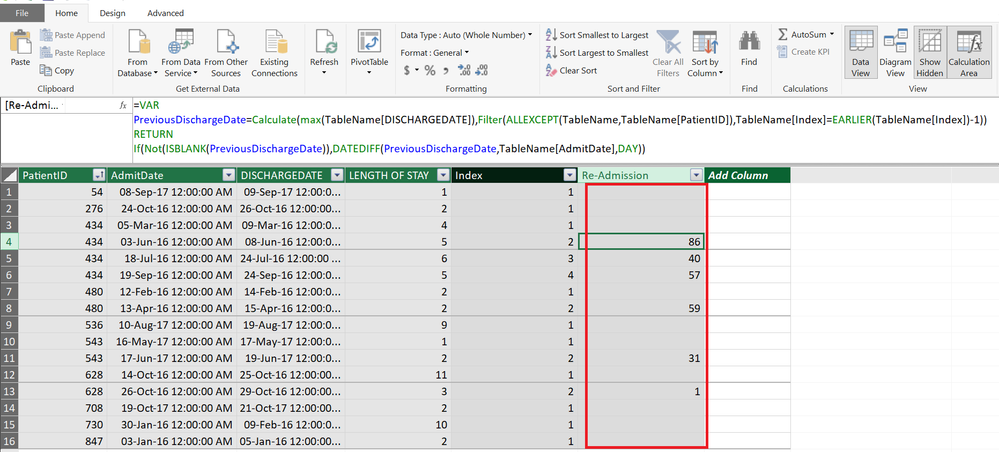
First add an Index Column for each PATIENTID. This will help in further calculations


Index =
RANKX (
    FILTER ( TableName, [PatientID] = EARLIER ( [PatientID] ) ),
    [AdmitDate],
    ,
    ASC,
    DENSE
)
Code beutified with Dax Formatter by SQLBI

Now you can get the Re-admission calculated column using this formula


Re Admission =
VAR PreviousDischargeDate =
    CALCULATE (
        MAX ( TableName[DISCHARGEDATE] ),
        FILTER (
            ALLEXCEPT ( TableName, TableName[PatientID] ),
            TableName[Index]
                = EARLIER ( TableName[Index] ) - 1
        )
    )
RETURN
    IF (
        NOT ( ISBLANK ( PreviousDischargeDate ) ),
        DATEDIFF ( PreviousDischargeDate, TableName[AdmitDate], DAY )
    )

Thanks a lot for your valuable inputs.  I am getting the following error.  Please help.


In DATEDIFF function, the start date cannot be greater than the end date


Regards,

Jay


@Jayadev

Re Admission =
VAR PreviousDischargeDate =
    CALCULATE (
        MAX ( TableName[DISCHARGEDATE] ),
        FILTER (
            ALLEXCEPT ( TableName, TableName[PatientID] ),
            TableName[Index]
                = EARLIER ( TableName[Index] ) - 1
        )
    )
RETURN
    IF (
        NOT ( ISBLANK ( PreviousDischargeDate ) ),
        IF (
            PreviousDischargeDate < TableName[AdmitDate],
            DATEDIFF ( PreviousDischargeDate, TableName[AdmitDate], DAY )
        )
    )


Try this revised formula


Hi,


Super solution, thanks a lot,  it works perfect. 


Warmest regards Jay, Once again Thanks.

Helpful resources

Announcements
FabCon and SQLCon Barcelona 2026

FabCon & SQLCon – Barcelona 2026

Join us in Barcelona for FabCon and SQLCon, the Fabric, Power BI, SQL, and AI community event. Save €200 with code FABCMTY200.

Fabric Community Sticker Design Challenge Barcelona Carousel

Fabric Community Sticker Challenge - Barcelona 2026

If you love stickers, then you will definitely want to check out our community sticker challenge, Barcelona edition!

July Power BI Update Carousel

Power BI Monthly Update - July 2026

Check out the July 2026 Power BI update to learn about new features.

Power BI DataViz World Championships carousel

Power BI DataViz World Championships - June 2026

A new Power BI DataViz World Championship is coming this June! Don't miss out on submitting your entry.

Top Solution Authors