Get certified for free when you join Fabric Data Days 2026 and dive into Fabric, Power BI, SQL, AI, and other essential data skills.
Join nowJuly 28 - August 9 | Final Round of the Power BI Dataviz World Championships. This is your chance. Learn more
I have some table data that shows when an Opportunity enters and leaves the "SE Queue."
I need to calculate total time the Opportunity spends In the SE Queue.
The problem is, the Opportunity enters and leaves the Queue multiple times. I need to find a way to calculate the DATEDIFF of each change of Status and don't know how.
I have a primary key/unique ID for each Opportunity
Solved! Go to Solution.
Hi @bhmiller89,
You can refer to below sample if it help for you.
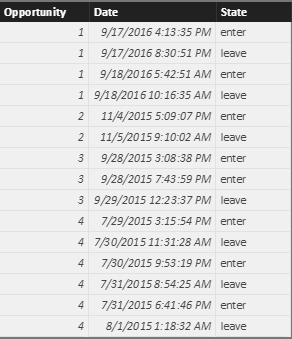
Table:
Measure:
Diff =
var currState= LASTNONBLANK(Sheet4[State],[State])
Return
if(currState="leave",DATEDIFF(MAXX(FILTER(ALL(Sheet4),Sheet4[Opportunity ]=MAX(Sheet4[Opportunity ])&&Sheet4[Date]<MAX([Date])),[Date]),MAX([Date]),SECOND),0)
Notice, If contain multiple "enter" date, it will get the "enter" date which nearliest the "leave" date.
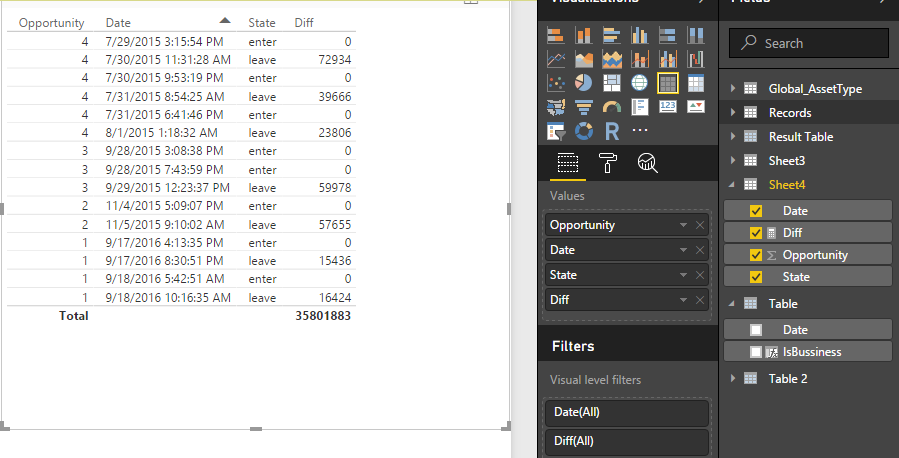
Create visual:
Then you only need to summary the diff of the same opportunity.
If above is not help, please share us some sample data.
Regards,
Xiaoxin Sheng
Hi @bhmiller89,
You can refer to below sample if it help for you.
Table:
Measure:
Diff =
var currState= LASTNONBLANK(Sheet4[State],[State])
Return
if(currState="leave",DATEDIFF(MAXX(FILTER(ALL(Sheet4),Sheet4[Opportunity ]=MAX(Sheet4[Opportunity ])&&Sheet4[Date]<MAX([Date])),[Date]),MAX([Date]),SECOND),0)
Notice, If contain multiple "enter" date, it will get the "enter" date which nearliest the "leave" date.
Create visual:
Then you only need to summary the diff of the same opportunity.
If above is not help, please share us some sample data.
Regards,
Xiaoxin Sheng
Can you post some sample data?
If you love stickers, then you will definitely want to check out our community sticker challenge, Barcelona edition!
Check out the July 2026 Power BI update to learn about new features.
| User | Count |
|---|---|
| 30 | |
| 28 | |
| 23 | |
| 21 | |
| 19 |
| User | Count |
|---|---|
| 40 | |
| 31 | |
| 18 | |
| 18 | |
| 15 |