This is best Fabric, Power BI, SQL and AI community event. How do we know? The last event sold out! Save €200 with code FABCMTY200.
Register nowA new Data Days event is coming soon! This time we’re going bigger than ever. Fabric, Power BI, SQL, AI and more. Don't miss out.
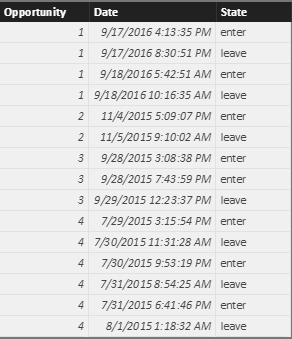
I have some table data that shows when an Opportunity enters and leaves the "SE Queue."
I need to calculate total time the Opportunity spends In the SE Queue.
The problem is, the Opportunity enters and leaves the Queue multiple times. I need to find a way to calculate the DATEDIFF of each change of Status and don't know how.
I have a primary key/unique ID for each Opportunity
Solved! Go to Solution.
Hi @bhmiller89,
You can refer to below sample if it help for you.
Table:
Measure:
Diff =
var currState= LASTNONBLANK(Sheet4[State],[State])
Return
if(currState="leave",DATEDIFF(MAXX(FILTER(ALL(Sheet4),Sheet4[Opportunity ]=MAX(Sheet4[Opportunity ])&&Sheet4[Date]<MAX([Date])),[Date]),MAX([Date]),SECOND),0)
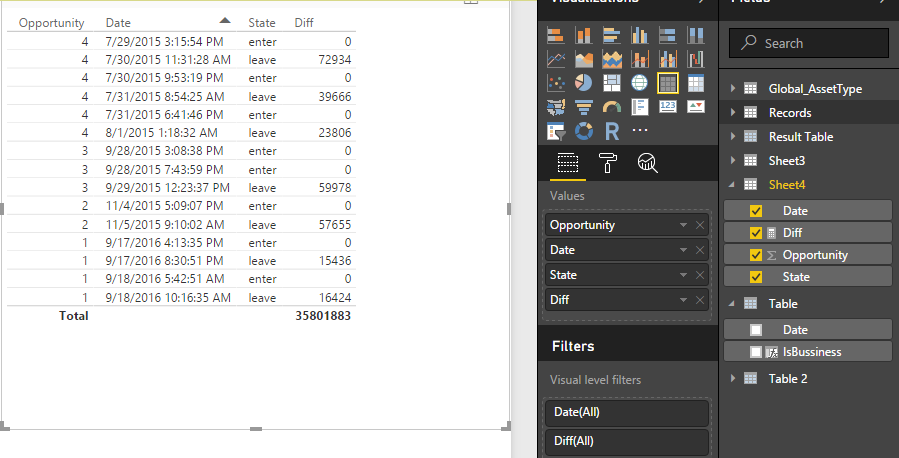
Notice, If contain multiple "enter" date, it will get the "enter" date which nearliest the "leave" date.
Create visual:
Then you only need to summary the diff of the same opportunity.
If above is not help, please share us some sample data.
Regards,
Xiaoxin Sheng
Hi @bhmiller89,
You can refer to below sample if it help for you.
Table:
Measure:
Diff =
var currState= LASTNONBLANK(Sheet4[State],[State])
Return
if(currState="leave",DATEDIFF(MAXX(FILTER(ALL(Sheet4),Sheet4[Opportunity ]=MAX(Sheet4[Opportunity ])&&Sheet4[Date]<MAX([Date])),[Date]),MAX([Date]),SECOND),0)
Notice, If contain multiple "enter" date, it will get the "enter" date which nearliest the "leave" date.
Create visual:
Then you only need to summary the diff of the same opportunity.
If above is not help, please share us some sample data.
Regards,
Xiaoxin Sheng
Can you post some sample data?
Check out the May 2026 Power BI update to learn about new features.
Sign up to receive a private message when registration opens and key events begin.
If you have recently started exploring Fabric, we'd love to hear how it's going. Your feedback can help with product improvements.
| User | Count |
|---|---|
| 31 | |
| 26 | |
| 23 | |
| 22 | |
| 15 |
| User | Count |
|---|---|
| 62 | |
| 47 | |
| 28 | |
| 24 | |
| 20 |