cancel
Showing results for 
Search instead for 
Did you mean: 

Learn from the best! Meet the four finalists headed to the FINALS of the Power BI Dataviz World Championships! Register now

Reply
S184019
Advocate III
Advocate III

Calculated field data bars

Is it possible or perhpas already in the works to be able to add data bars to DAX calculated fields?  Once a field is calculated it seems that the data bar option is no longer available. 


Thanks, 


Mark

4 REPLIES 4
S184019
Advocate III
Advocate III

Hello, 


       I have a table with multiple calculated fields.  One is a integer, another a decimal and so on.  Within that table I needed to add a percent of those fields.  Not a problem, got that added and formatted with the necessary conditionality, but once I did, I lost the conditional data bars.  


       How does one go about adding those data bars back using DAX?  Below is a snippit of my DAX code.


Summarized Table = 
UNION(
(ADDCOLUMNS (
    SUMMARIZE (
        'Measure',
        'Measure'[Dept],
	    "Value", SUM('Measure'[Target1]),
        "Target", BLANK()
    ),
    "Type", "Your FYTD Target", "Sort", 2 )),
(ADDCOLUMNS (
    SUMMARIZE (
        'NTC Summary',
        'NTC Summary'[Dept],
    "Value", SUM('NTC Summary'[Value]),
    "Target", SUM('NTC Summary'[Target])
    ),
    "Type", "Your Value", "Sort", 3 )),

(ADDCOLUMNS (
    SUMMARIZE (
        'Measure',
        'Measure'[Dept],
    "Value", SUM('Measure'[Target2]),
    "Target", BLANK()
    ),
    "Type", "Your Target", "Sort", 1 )),
(ADDCOLUMNS (
    SUMMARIZE (
        'Measure',
        'Measure'[Dept],
    "Value", FORMAT('Measure'[% Growth]/100, "Percent"),
    "Target", BLANK()
    ),
    "Type", "Avg % Growth (FYTD v. PFYTD)", "Sort", 4 )))

Thanks in advance!


Humbly yours, 


Mark

v-qiuyu-msft
Community Support
Community Support

Hi @S184019,


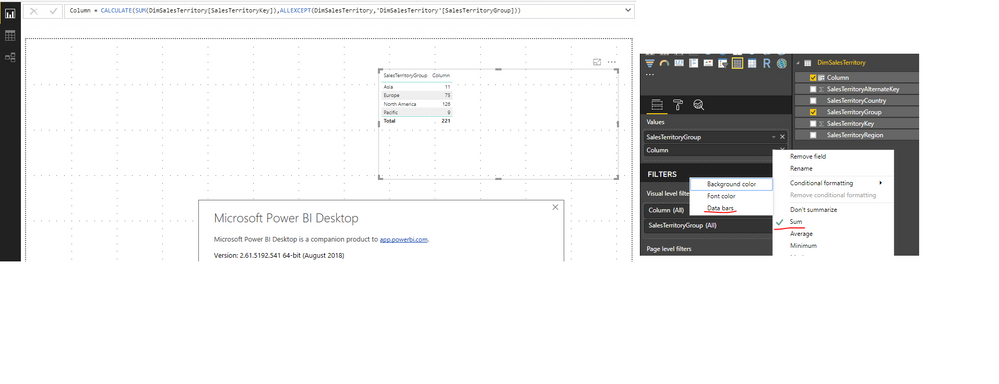
Based on my test in Power BI desktop August version, as long as the calculated column putted in the table visual has been set with one aggregation (eg: SUM), the Data Bars is available in conditional Formatting options. 


q1.PNG

In your scenario, please ensure the calculated field you mentioned has be set with one aggregation. Please run desktop August version if possible. 


Best Regards,
Qiuyun Yu 

Community Support Team _ Qiuyun Yu
If this post helps, then please consider Accept it as the solution to help the other members find it more quickly.

@v-qiuyu-msft


Thank you for this quick reply!


Alas, the code shows 2 separate aggreagation types:

  1. Summing the first 3 cols.
  2. % Growth / 100 in last col.

Perhaps this is something which may be added to DAX or PBI in the future?  Dax Code could be:


FORMATBAR('Table'[Column],MIN,MAX)


Is there another work around? 


Thanks again for the help!


@S184019 wrote:

@v-qiuyu-msft


Thank you for this quick reply!


Alas, the code shows 2 separate aggreagation types:

  1. Summing the first 3 cols.
  2. % Growth / 100 in last col.

Perhaps this is something which may be added to DAX or PBI in the future?  Dax Code could be:


FORMATBAR('Table'[Column],MIN,MAX)


Is there another work around? 


Thanks again for the help!


Hi @S184019,


Not sure what you mean about above highlighted section? Would you please share some screenshots to clarify it? 


Best Regards,
Qiuyun Yu 

Community Support Team _ Qiuyun Yu
If this post helps, then please consider Accept it as the solution to help the other members find it more quickly.

Helpful resources

Announcements
Power BI DataViz World Championships carousel

Power BI DataViz World Championships - June 2026

A new Power BI DataViz World Championship is coming this June! Don't miss out on submitting your entry.

Join our Fabric User Panel

Join our Fabric User Panel

Share feedback directly with Fabric product managers, participate in targeted research studies and influence the Fabric roadmap.

March Power BI Update Carousel

Power BI Community Update - March 2026

Check out the March 2026 Power BI update to learn about new features.