cancel
Showing results for 
Search instead for 
Did you mean: 

July 7 - July 17 | Round 2 of the Power BI Dataviz World Championships. Don't miss your chance! Learn more

Reply
hatahetahmad
Helper I
Helper I

Calculated Invoices Count with filtered Measure

Hello,


I have Sales Table contains (Date, ID, Sales Rep, Product, Total)


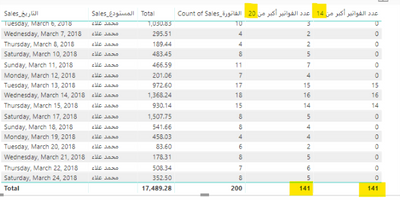
I Counted the Invoices above 20$ (Used calculate and calculated distinct invoices count)


But My Question when Invoices Count More than 14 invoices give the number else give me 0

I did If Condition It seems right, but the total giving me the same number as Counted the Invoices above 20$

My tables filterd by Date and Sales Rep Name, I Expect to get the total of invoices that Excedd 20$ per invoice and exceed 14 invoice per working day.


Sketch.png


1 ACCEPTED SOLUTION

Hi @hatahetahmad,


Try this new measure.

Measure =
SUMX (
    VALUES ( data[Date] ),
    IF ( [Invoices Above 20$] >= 14, [Invoices Above 20$], 0 )
)

aa


Best Regards,

Dale

Community Support Team _ Dale
If this post helps, then please consider Accept it as the solution to help the other members find it more quickly.

View solution in original post

6 REPLIES 6
Anonymous
Not applicable

Rather than using an if statement, would it not work if you just use the filter part of the calculate function? 

Something like:


calculate(distinctcount('Sales Table'[Sales]),'Sales Table'[Invoice] > 14)

Thank you ThomasDaviesMCR for the reply,


I cant Do that because I made a Mesure that give me invoices Number (each invoice exceed 20$ total)


So, Building in this Measure I want DISTINCTCOUNT of invoices If each day exceed 14 invoices of the 20$


Example: 

Day 1 - 20 invoices made (only 12 above 20$) then the measure I want to give me 0 for Day 1

Day 2 - 18 invoices made (only 15 above 20$) then the measure I want to give me 15 for Day 2

Day 3 - 14 invoices made (only 14 above 20$) then the measure I want to give me 14 for Day 3

Hi @hatahetahmad,


Try a measure like below. Or you can share a sample.

Measure =
SUMX ( VALUES ( 'table'[sales] ), COUNT ( 'table'[invoice] ) )

Best Regards,

Dale

Community Support Team _ Dale
If this post helps, then please consider Accept it as the solution to help the other members find it more quickly.

I'm afraid that didn't work,


Here is sample of my data.

Hi @hatahetahmad,


Try this new measure.

Measure =
SUMX (
    VALUES ( data[Date] ),
    IF ( [Invoices Above 20$] >= 14, [Invoices Above 20$], 0 )
)

aa


Best Regards,

Dale

Community Support Team _ Dale
If this post helps, then please consider Accept it as the solution to help the other members find it more quickly.

Finally, Thank you.

Helpful resources

Announcements
FabCon and SQLCon Barcelona 2026

FabCon & SQLCon – Barcelona 2026

Join us in Barcelona for FabCon and SQLCon, the Fabric, Power BI, SQL, and AI community event. Save €200 with code FABCMTY200.

60 days of Data Days Carousel

Data Days 2026

Join Fabric Data Days 2026: 60 days of free live/on-demand sessions, challenges, study groups, and certification opportunities.

Power BI DataViz World Championships carousel

Power BI DataViz World Championships - June 2026

A new Power BI DataViz World Championship is coming this June! Don't miss out on submitting your entry.