This time we’re going bigger than ever. Fabric, Power BI, SQL, AI and more. We're covering it all. You won't want to miss it.
Learn moreLevel up your Power BI skills this month - build one visual each week and tell better stories with data! Get started
Hello,
I have Sales Table contains (Date, ID, Sales Rep, Product, Total)
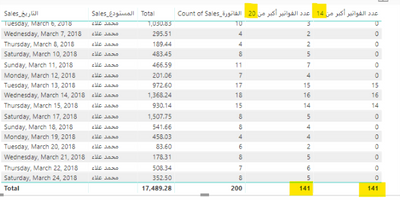
I Counted the Invoices above 20$ (Used calculate and calculated distinct invoices count)
But My Question when Invoices Count More than 14 invoices give the number else give me 0
I did If Condition It seems right, but the total giving me the same number as Counted the Invoices above 20$
My tables filterd by Date and Sales Rep Name, I Expect to get the total of invoices that Excedd 20$ per invoice and exceed 14 invoice per working day.
Solved! Go to Solution.
Hi @hatahetahmad,
Try this new measure.
Measure =
SUMX (
VALUES ( data[Date] ),
IF ( [Invoices Above 20$] >= 14, [Invoices Above 20$], 0 )
)
Best Regards,
Dale
Rather than using an if statement, would it not work if you just use the filter part of the calculate function?
Something like:
calculate(distinctcount('Sales Table'[Sales]),'Sales Table'[Invoice] > 14)
Thank you ThomasDaviesMCR for the reply,
I cant Do that because I made a Mesure that give me invoices Number (each invoice exceed 20$ total)
So, Building in this Measure I want DISTINCTCOUNT of invoices If each day exceed 14 invoices of the 20$
Example:
Day 1 - 20 invoices made (only 12 above 20$) then the measure I want to give me 0 for Day 1
Day 2 - 18 invoices made (only 15 above 20$) then the measure I want to give me 15 for Day 2
Day 3 - 14 invoices made (only 14 above 20$) then the measure I want to give me 14 for Day 3
Hi @hatahetahmad,
Try a measure like below. Or you can share a sample.
Measure = SUMX ( VALUES ( 'table'[sales] ), COUNT ( 'table'[invoice] ) )
Best Regards,
Dale
Hi @hatahetahmad,
Try this new measure.
Measure =
SUMX (
VALUES ( data[Date] ),
IF ( [Invoices Above 20$] >= 14, [Invoices Above 20$], 0 )
)
Best Regards,
Dale
Finally, Thank you.
Check out the April 2026 Power BI update to learn about new features.
Sign up to receive a private message when registration opens and key events begin.
If you have recently started exploring Fabric, we'd love to hear how it's going. Your feedback can help with product improvements.
| User | Count |
|---|---|
| 35 | |
| 32 | |
| 26 | |
| 21 | |
| 18 |
| User | Count |
|---|---|
| 68 | |
| 39 | |
| 33 | |
| 24 | |
| 23 |