Get certified for free when you join Fabric Data Days 2026 and dive into Fabric, Power BI, SQL, AI, and other essential data skills.
Join nowJuly 28 - August 9 | Final Round of the Power BI Dataviz World Championships. This is your chance. Learn more
Hello,
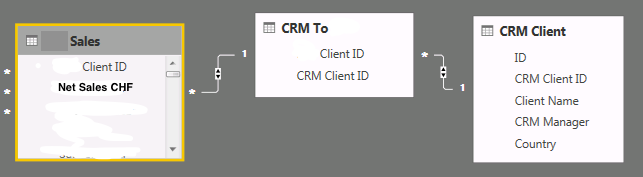
I have these 3 tables:
I want to create a calculate field with the sum all Net Sales by Client on table CRM Client. How can I do it? Any ideas?
Thanks,
Solved! Go to Solution.
Hi,
The proper answer is this one: Measure = SUMX('CRM Client';'PCS Sales'[NET Value CHF Measure])
Hi @diogovaz,
Could you please mark the proper answer as solution or share the solution if it's convenient for you? That will be a big help to the others.
Best Regards!
Dale
Hi,
The proper answer is this one: Measure = SUMX('CRM Client';'PCS Sales'[NET Value CHF Measure])
Hi @diogovaz,
CALCULATE() may be needed.
Best Regards!
Dale
Hi,
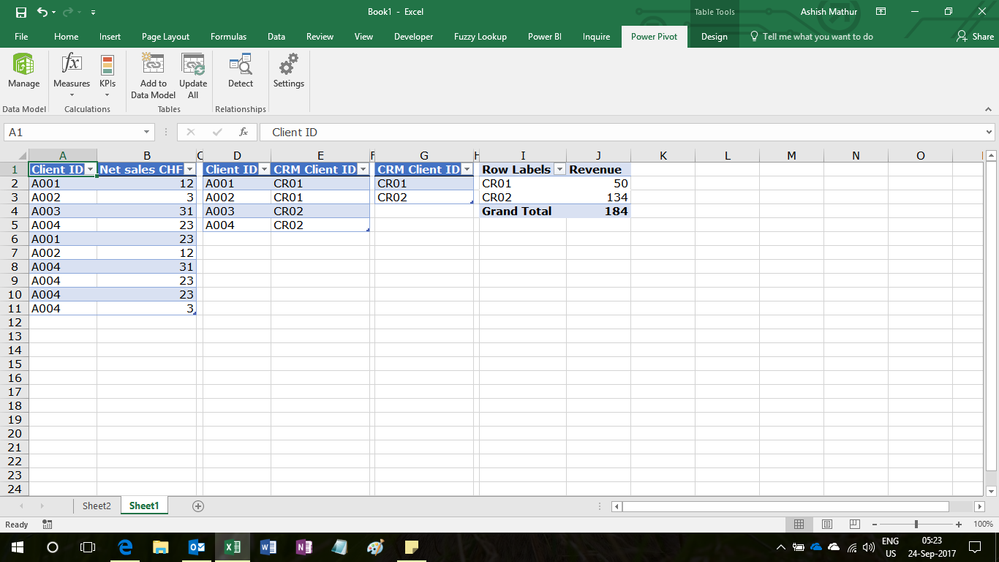
Drag CRM Client ID from the CRM_client table (Table 3) and then write the following calculated field formula in the Sales table
=SUM(Sales[Net Sales CHF])
Hi @diogovaz,
You can create measure like test = SUMX(CRM Client, Sales[Net Sales CHF]>0). Or use calculate.
If you love stickers, then you will definitely want to check out our community sticker challenge, Barcelona edition!
Check out the July 2026 Power BI update to learn about new features.
| User | Count |
|---|---|
| 28 | |
| 28 | |
| 20 | |
| 19 | |
| 19 |
| User | Count |
|---|---|
| 35 | |
| 26 | |
| 19 | |
| 18 | |
| 17 |