Join us at FabCon Atlanta from March 16 - 20, 2026, for the ultimate Fabric, Power BI, AI and SQL community-led event. Save $200 with code FABCOMM.
Register now!Vote for your favorite vizzies from the Power BI Dataviz World Championship submissions. Vote now!
Hello,
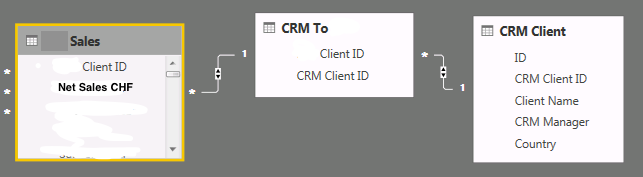
I have these 3 tables:
I want to create a calculate field with the sum all Net Sales by Client on table CRM Client. How can I do it? Any ideas?
Thanks,
Solved! Go to Solution.
Hi,
The proper answer is this one: Measure = SUMX('CRM Client';'PCS Sales'[NET Value CHF Measure])
Hi @diogovaz,
Could you please mark the proper answer as solution or share the solution if it's convenient for you? That will be a big help to the others.
Best Regards!
Dale
Hi,
The proper answer is this one: Measure = SUMX('CRM Client';'PCS Sales'[NET Value CHF Measure])
Hi @diogovaz,
CALCULATE() may be needed.
Best Regards!
Dale
Hi,
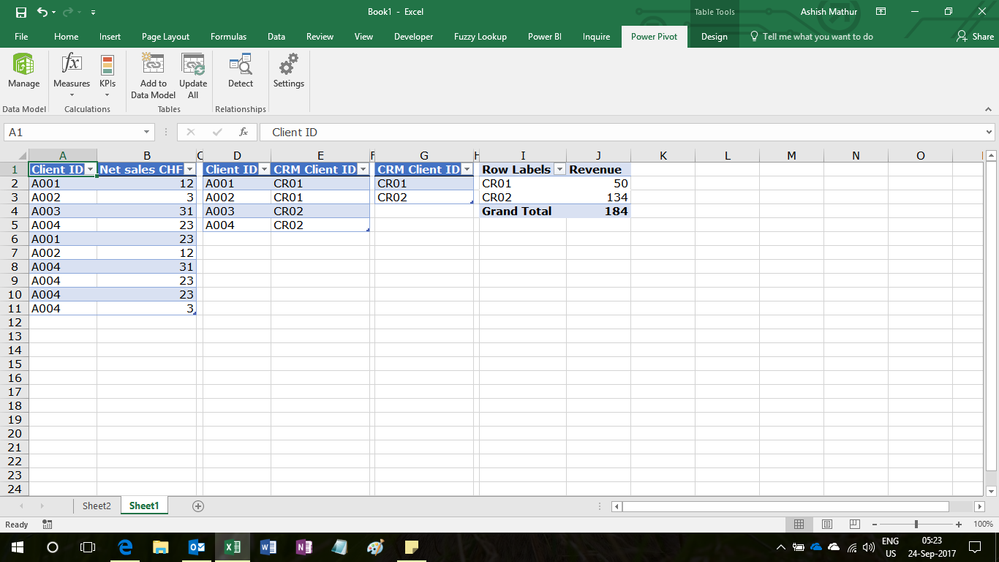
Drag CRM Client ID from the CRM_client table (Table 3) and then write the following calculated field formula in the Sales table
=SUM(Sales[Net Sales CHF])
Hi @diogovaz,
You can create measure like test = SUMX(CRM Client, Sales[Net Sales CHF]>0). Or use calculate.
Vote for your favorite vizzies from the Power BI World Championship submissions!
If you love stickers, then you will definitely want to check out our Community Sticker Challenge!
Check out the January 2026 Power BI update to learn about new features.
| User | Count |
|---|---|
| 58 | |
| 53 | |
| 43 | |
| 17 | |
| 16 |
| User | Count |
|---|---|
| 123 | |
| 108 | |
| 44 | |
| 32 | |
| 24 |