This time we’re going bigger than ever. Fabric, Power BI, SQL, AI and more. We're covering it all. You won't want to miss it.
Learn moreDid you hear? There's a new SQL AI Developer certification (DP-800). Start preparing now and be one of the first to get certified. Register now
Hello,
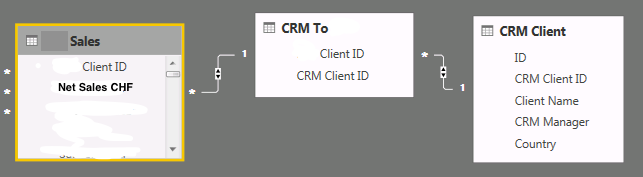
I have these 3 tables:
I want to create a calculate field with the sum all Net Sales by Client on table CRM Client. How can I do it? Any ideas?
Thanks,
Solved! Go to Solution.
Hi,
The proper answer is this one: Measure = SUMX('CRM Client';'PCS Sales'[NET Value CHF Measure])
Hi @diogovaz,
Could you please mark the proper answer as solution or share the solution if it's convenient for you? That will be a big help to the others.
Best Regards!
Dale
Hi,
The proper answer is this one: Measure = SUMX('CRM Client';'PCS Sales'[NET Value CHF Measure])
Hi @diogovaz,
CALCULATE() may be needed.
Best Regards!
Dale
Hi,
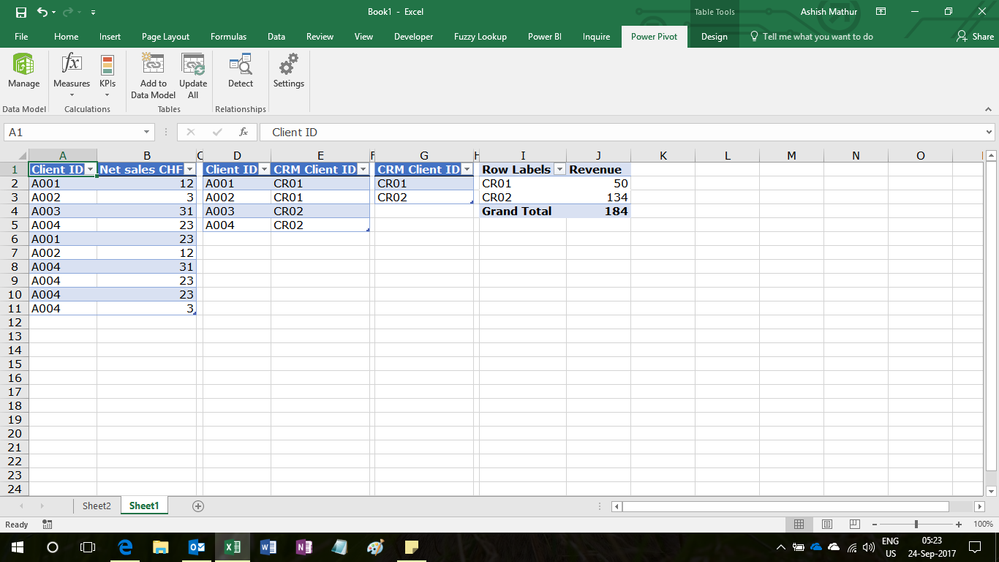
Drag CRM Client ID from the CRM_client table (Table 3) and then write the following calculated field formula in the Sales table
=SUM(Sales[Net Sales CHF])
Hi @diogovaz,
You can create measure like test = SUMX(CRM Client, Sales[Net Sales CHF]>0). Or use calculate.
Check out the April 2026 Power BI update to learn about new features.
Sign up to receive a private message when registration opens and key events begin.
If you have recently started exploring Fabric, we'd love to hear how it's going. Your feedback can help with product improvements.
| User | Count |
|---|---|
| 34 | |
| 31 | |
| 25 | |
| 20 | |
| 16 |
| User | Count |
|---|---|
| 61 | |
| 49 | |
| 28 | |
| 23 | |
| 23 |