cancel
Showing results for 
Search instead for 
Did you mean: 

July 7 - July 17 | Round 2 of the Power BI Dataviz World Championships. Don't miss your chance! Learn more

Reply
Anonymous
Not applicable

Calculated Column from same table rows

Hi,


I am trying to create a new column Calculated Column [New Epic Name] which will have the EPIC Name.


For the Type = Epic, the Epic Name is in 3rd Column "Epic Name"

For the Type = Task, the Epic Name is in 4th Column "Epic Link"

But for Sub-Task the Epic Name will be the Parent Key "Ticket" [Epic Link]


I am trying this way, but not doing a good job, I know there should be a easy way.


New Epic Name =

IF (

 Worklogs[Epic Link] = BLANK (),

 CALCULATE ( Worklogs[Epic Link] , ALLEXCEPT ( Worklogs, Worklogs[Parent Key] ) ),

 Worklogs[Epic Link]

 )


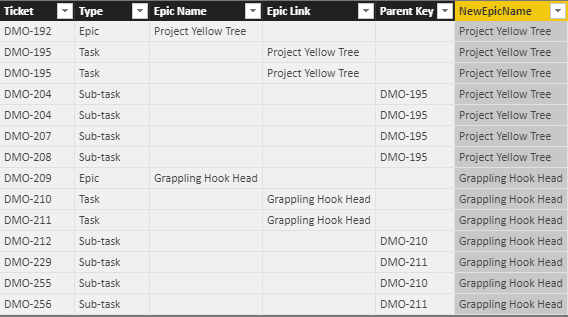
Ticket TypeEpic NameEpic LinkParent KeyCalculated Column [New Epic Name]
DMO-192EpicProject Yellow Tree   
DMO-195Task Project Yellow Tree  
DMO-204Sub-task  DMO-195 
DMO-207Sub-task  DMO-195 
DMO-208Sub-task  DMO-195 
DMO-209EpicGrappling Hook Head   
DMO-210Task Grappling Hook Head  
DMO-211Task Grappling Hook Head  
DMO-212Sub-task  DMO-210 
DMO-229Sub-task  DMO-211 
DMO-255Sub-task  DMO-210 
DMO-256Sub-task  DMO-211 


Thanks,

Joydeep

1 ACCEPTED SOLUTION
PattemManohar
Community Champion
Community Champion

@Anonymous Please try this by adding as "New Column"


NewEpicName = 
VAR _lkp = LOOKUPVALUE(EpicsTest[Epic Link],EpicsTest[Ticket],EpicsTest[Parent Key])
VAR _epic = IF(EpicsTest[Type]="Epic",EpicsTest[Epic Name],
                                    IF(EpicsTest[Type] = "Task",EpicsTest[Epic Link],
                                                                _lkp))
RETURN _epic  

image.png


Did I answer your question? Mark my post as a solution!

Proud to be a PBI Community Champion


View solution in original post

6 REPLIES 6
PattemManohar
Community Champion
Community Champion

@Anonymous Please try this by adding as "New Column"


NewEpicName = 
VAR _lkp = LOOKUPVALUE(EpicsTest[Epic Link],EpicsTest[Ticket],EpicsTest[Parent Key])
VAR _epic = IF(EpicsTest[Type]="Epic",EpicsTest[Epic Name],
                                    IF(EpicsTest[Type] = "Task",EpicsTest[Epic Link],
                                                                _lkp))
RETURN _epic  

image.png


Did I answer your question? Mark my post as a solution!

Proud to be a PBI Community Champion


Anonymous
Not applicable

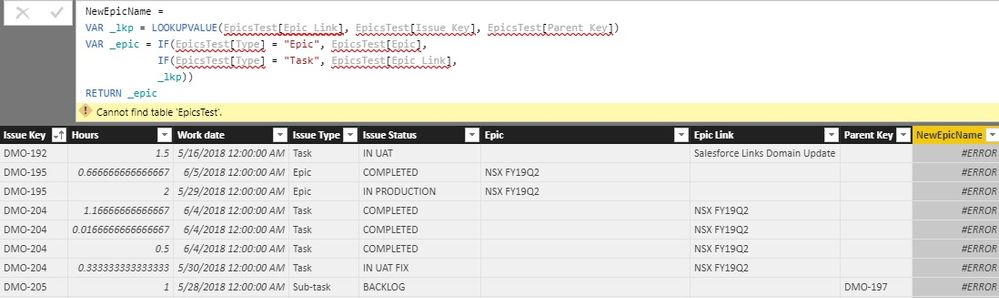
@PattemManohar I am getting error, it says Cannot find table 'EpicsTest'.


error.jpg


@Barnee yes the 3rd part is what it tricky, or else could have used RELATED()

@Anonymous EpicsTest is the table I've used, you need to give your table name and corresponding fields accordingly...


Did I answer your question? Mark my post as a solution!

Proud to be a PBI Community Champion


Anonymous
Not applicable

Thank you @PattemManohar it worked perfectly 

Oh I see, I didn't read through the third part properly. 

Barnee
Advocate IV
Advocate IV

Hey @Anonymous,


try this one out:

New Epic Name = IF(
                  AND(Table1[Epic Name]=BLANK(),Table1[Parent Key]=BLANK()),
                  Table1[Epic Link],
                  IF(
                    AND(Table1[Epic Name]=BLANK(),Table1[Epic Link]=BLANK()),
                    Table1[Parent Key],
                    Table1[Epic Name])
                   )


Please let me know if it's what you wished to achieve.


Regards,

Barna 

Helpful resources

Announcements
FabCon and SQLCon Barcelona 2026

FabCon & SQLCon – Barcelona 2026

Join us in Barcelona for FabCon and SQLCon, the Fabric, Power BI, SQL, and AI community event. Save €200 with code FABCMTY200.

60 days of Data Days Carousel

Data Days 2026

Join Fabric Data Days 2026: 60 days of free live/on-demand sessions, challenges, study groups, and certification opportunities.

Power BI DataViz World Championships carousel

Power BI DataViz World Championships - June 2026

A new Power BI DataViz World Championship is coming this June! Don't miss out on submitting your entry.